
Settings overview
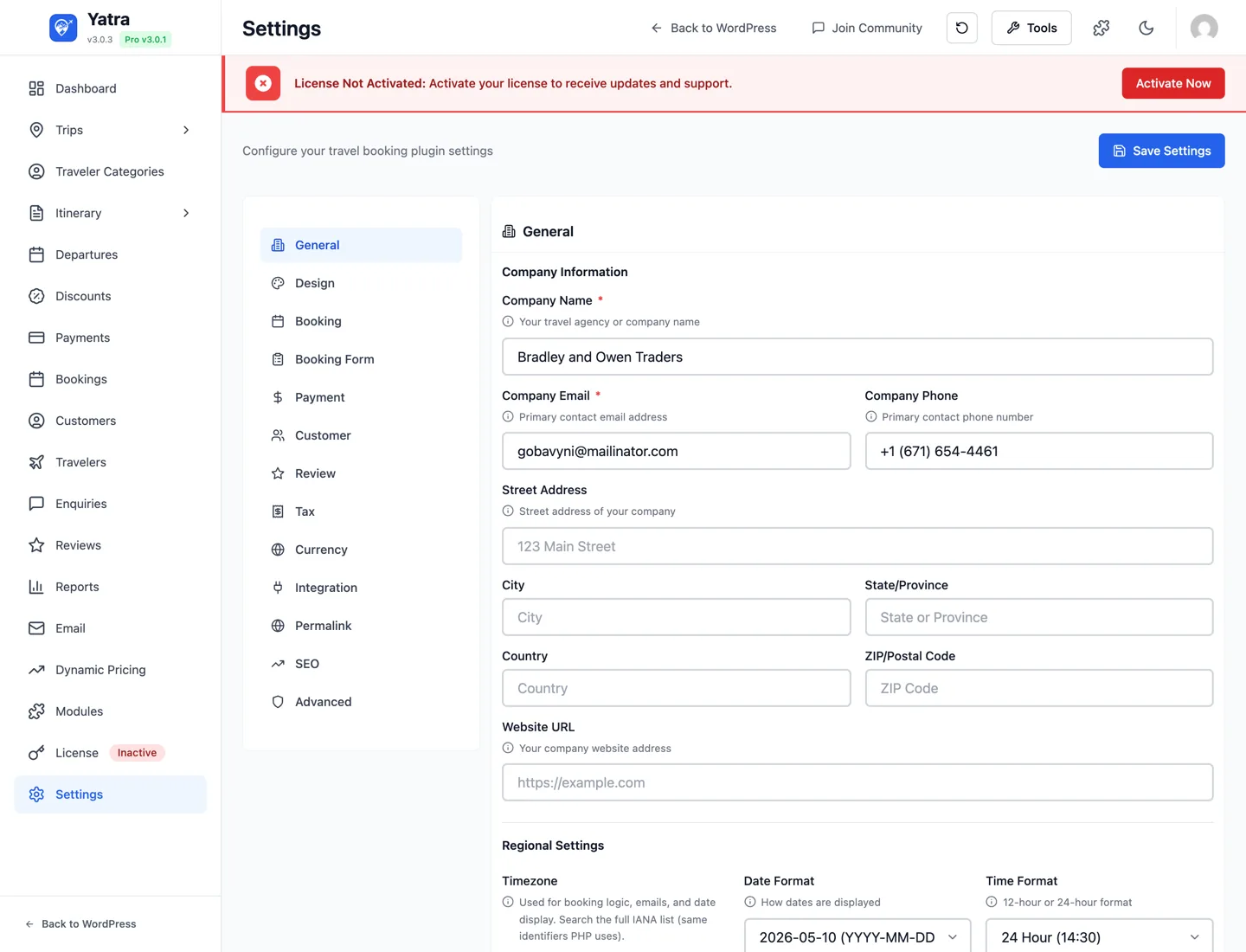
The Settings screen at Yatra → Settings is one screen with 15 tabs in a left-hand sidebar (Pricing only appears when its Pro modules are active). This page tells you what each tab is for, lists every control inside it, and points at the deeper docs (Bookings, Payments, Email) when there's a dedicated guide.
Where Yatra stores settings
Each control writes to its own row in the WordPress wp_options table — for example, the Default currency dropdown writes to the yatra_currency option. Developers can read or override these programmatically — see the Reading settings programmatically section at the bottom of this page.
The 15 tabs
| # | Tab | What it controls | Pro-only fields? |
|---|---|---|---|
| 1 | General | Company identity, address, regional formatting | No |
| 2 | Design | Front-end brand colour and container width | No |
| 3 | Booking | Checkout behaviour, expiry, cancellation, waitlist | No |
| 4 | Booking Form | Drag-and-drop builder for the checkout form | No (Pro extends per-trip) |
| 5 | Payment | Test mode, deposits, partial / scheduled payments | Some (deposit / scheduled = Pro) |
| 6 | Pricing | Discount stacking — how Advanced Discount and Dynamic Pricing combine | Pro-conditional (visible when both modules are on) |
| 7 | Customer | Account behaviour, registration, wishlist | Wishlist = Pro |
| 8 | Review | Review system toggles & moderation | No |
| 9 | Tax | Tax rates, inclusive pricing, VAT number | No |
| 10 | Currency | Currency code, position, separators, decimals | No |
| 11 | Integration | Mailchimp, Facebook Pixel, GA4, Google Calendar, reCAPTCHA | All Pro-conditional |
| 12 | Permalink | URL slugs for trips, destinations, activities, categories | No |
| 13 | SEO | Meta tags for the trip archive | No |
| 14 | Advanced | Logging, cache, legal pages, telemetry | No |
| 15 | Search & Listing | Which trip search-bar fields show; collapse listing filters on mobile (sits between Booking Form and Payment in the admin) | No |
How to use this page
- Looking for what a control does → find the tab heading and scan the table.
- Looking for a setting key in code → the Setting key column is the
wp_optionsrow name (always prefixedyatra_<key>in the database; the schema uses the unprefixed name). - Looking for deep guidance on a specific area → the Bookings, Payments, and Email pages cover the matching admin modules in full.
Permissions
Saving settings requires the WordPress manage_options capability. The REST endpoint behind the page (POST /yatra/v1/settings) checks this on every write. See REST API → Settings for the full surface.
1. General
Company identity, full address, website, and regional formatting.
Company Information
| Control | Setting key | Default | Notes |
|---|---|---|---|
| Company Name | company_name | (empty) | Required-flagged in UI. Used in invoices, vouchers, and email "From" name. |
| Company Email | company_email | (empty) | Required-flagged in UI. Falls back to the WordPress admin email when blank. |
| Company Phone | company_phone | (empty) | Surfaced on PDFs. |
| Company Address | company_address | (empty) | Street address line. |
| City | company_city | (empty) | Shown on invoices below the street. |
| State / Province | company_state | (empty) | Shown on invoices. |
| Country | company_country | (empty) | Free-text country name. |
| ZIP / Postal Code | company_zip | (empty) | Shown on invoices. |
| Website | company_website | (empty) | URL. Linked from the company name on receipts. |
Regional Formatting
| Control | Setting key | Default | Notes |
|---|---|---|---|
| Timezone | timezone | UTC | Searchable dropdown of all WP-supported time zones. Affects how booking and travel dates are stored / displayed. |
| Date Format | date_format | Y-m-d | Dropdown with many PHP date-format presets. Affects all admin and customer views. |
| Time Format | time_format | H:i | Two options: H:i (24-hour) or h:i A (12-hour). |
2. Design
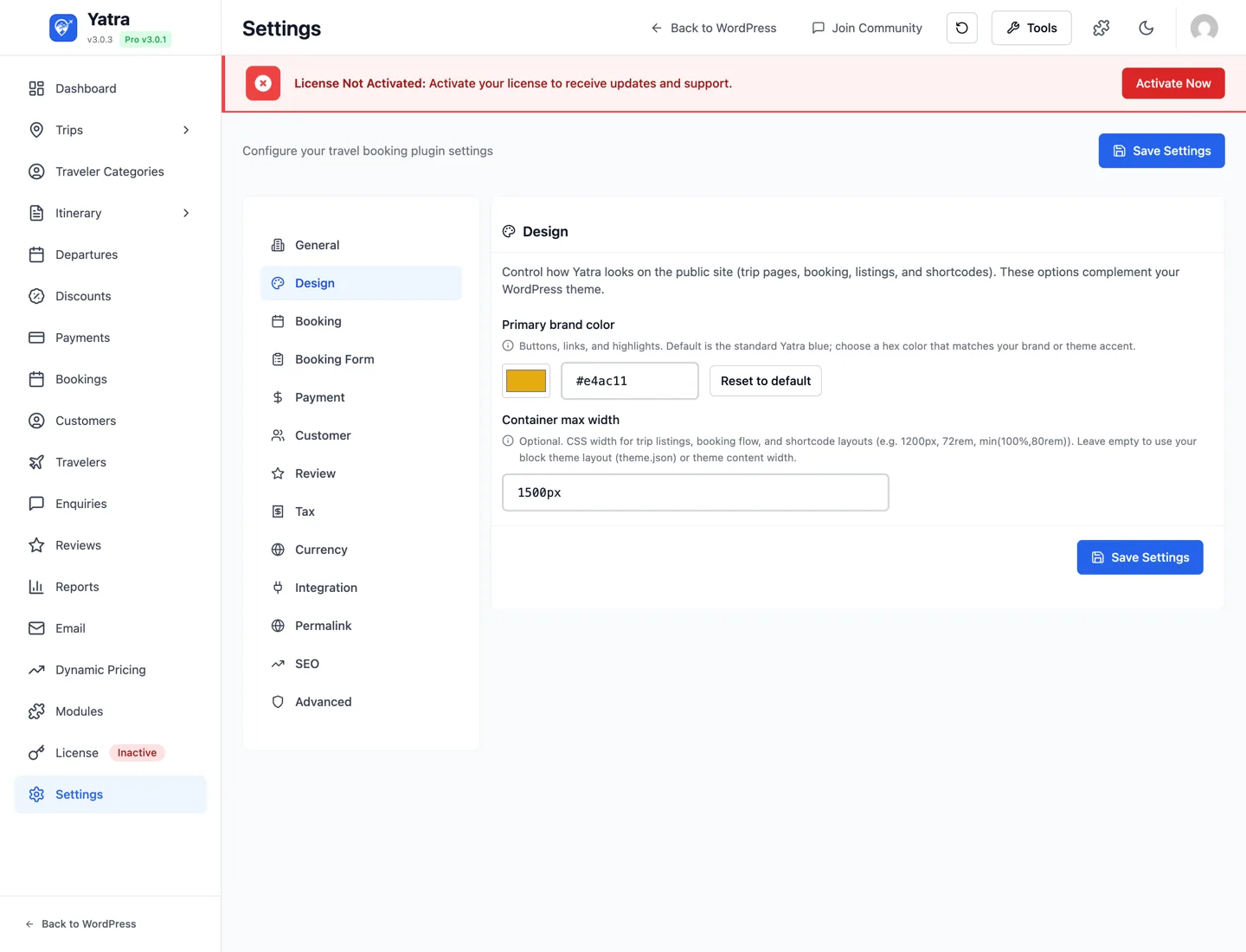
Front-end appearance — what your customers see on trip and booking pages.
| Control | Setting key | Default | Notes |
|---|---|---|---|
| Primary brand color | frontend_primary_color | #3b82f6 | Hex value with a color-picker and a paired text input. Reset to default button restores #3b82f6. Drives buttons, links, and highlights via CSS variables. |
| Container max width | frontend_container_max_width | (empty) | Optional CSS length (1200px, 72rem, min(100%,80rem)). Empty = inherit your block theme theme.json / theme content width. |
| Listing Card Layout | frontend_listing_card_layout | standard | How trip cards look in listings. Picked from an illustrated selector: Standard (the full card), Compact (mobile only) (compact_mobile — dense horizontal cards on phones, desktop unchanged), or Compact (everywhere) (compact_all). Opt-in and additive — existing sites keep the Standard card. |
The Compact card keeps only the image, title, price and View Details button, so mobile listings show more trips per screen. It applies everywhere trips are listed — the archive/taxonomy pages, the [yatra_trip] / [yatra_tour] shortcode, and the Trip block — and respects the visitor's Grid / List toggle. A single shortcode or block can override the site-wide choice with its own card_layout / Card layout control (see Shortcodes).
3. Booking
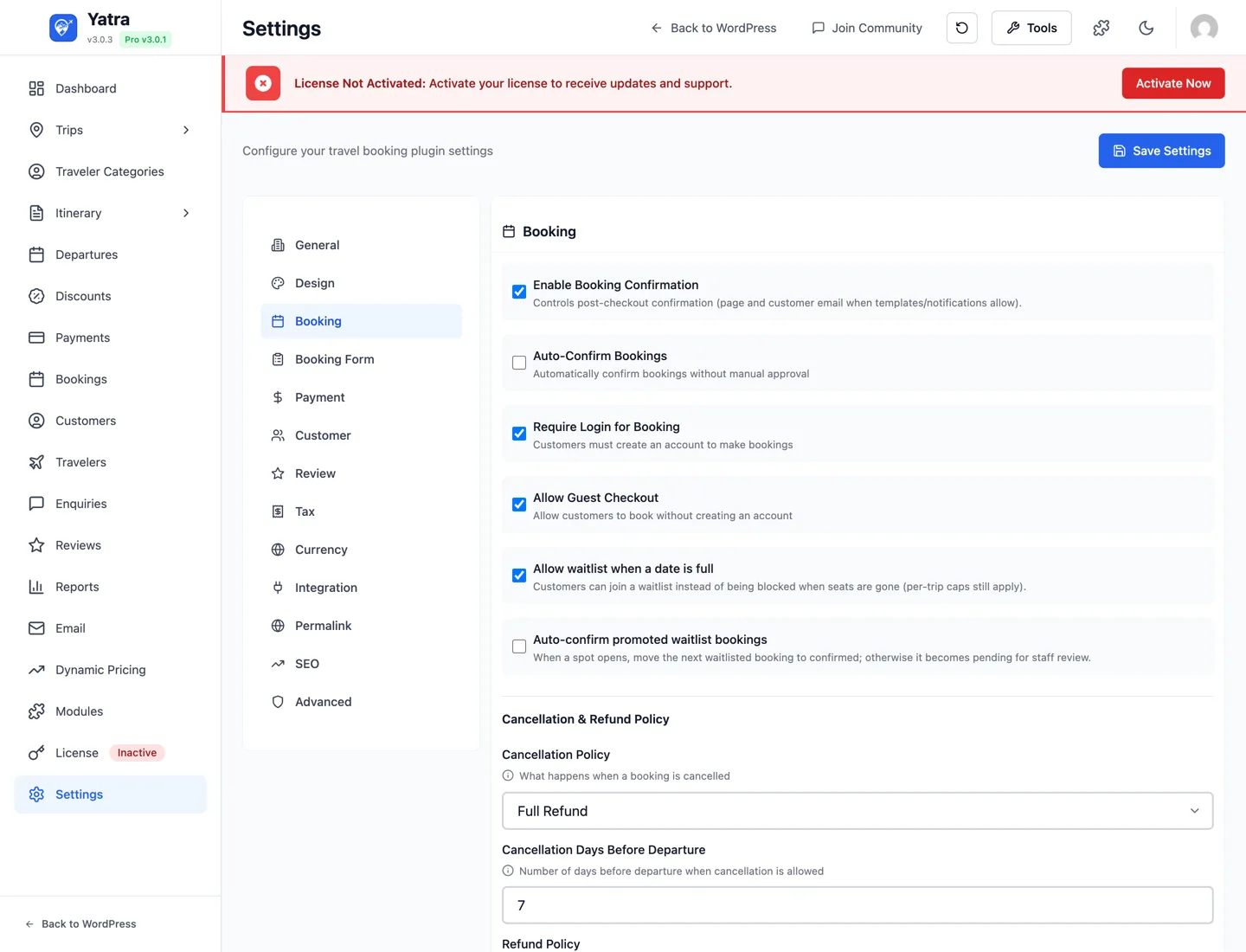
Day-to-day checkout behaviour. For the full operator guide, see Bookings & customers.
| Control | Setting key | Default | Notes |
|---|---|---|---|
| Enable Booking Confirmation | booking_confirmation | true | Whether to send the confirmation email after status change to Confirmed. |
| Auto-Confirm Bookings | auto_confirm_mode | online | When a booking becomes Confirmed — a 3-way choice: none, online (default), or all. See Auto-Confirm modes below. |
| Require Login for Booking | require_login | false | Forces login at the start of checkout. |
| Allow Guest Checkout | allow_guest_checkout | true | If off, customers must log in before they can complete checkout. |
| Allow Waitlist | allow_waitlist | true | Show the Join waitlist CTA when a departure is sold out. |
| Booking horizon (months) | availability_horizon_months | 12 | How far ahead customers can see and book dates on the storefront (1–36). A trip whose Available To is earlier stops there. Developers: yatra_availability_horizon_months filter. |
| Waitlist Auto-Confirm | waitlist_auto_confirm | false | Auto-promote waitlisted bookings when capacity opens up. |
| Cancellation Policy | cancellation_policy | full_refund | One of no_refund, partial_refund, full_refund. Surfaces on confirmation. |
| Cancellation Days Before Departure | cancellation_days | 7 | Days before travel after which a customer cannot self-cancel. |
| Refund Policy | refund_policy | (empty) | Free-text shown on the booking summary page. |
| Booking Expiry (hours) | booking_expiry_hours | 24 | An unpaid booking left in Pending longer than this is cancelled by an hourly sweep, and its seat released. 0 disables it. Only bookings created after you update to 3.0.15 are ever expired, so an existing backlog is never cancelled retroactively. Deposit-paid, confirmed and unverified-guest bookings are never touched. Developers: yatra_auto_expire_bookings. |
| Booking Reminder (days) | booking_reminder_days | 3 | How many days before travel the pre-trip reminder is emailed. Sent by a daily sweep to bookings travelling exactly that many days out — confirmed ones, plus pending ones that have paid a deposit. 0 disables it. |
Where's the booking page picker?
The booking flow lives at /{booking_base}/{trip-slug}/ by default (configured on the Permalink tab). There's no "embed the booking app inside a WordPress page" toggle in this build — earlier versions of the doc mentioned use_booking_page and booking_page_id, but the source no longer exposes that setting.
Auto-Confirm modes
The Auto-Confirm Bookings control (auto_confirm_mode) decides when a booking is automatically set to Confirmed:
| Mode | Behaviour |
|---|---|
Don't auto-confirm (none) | Every booking stays Pending until you confirm it manually — for operators who vet each booking before committing. |
Auto-confirm online payments only (online, default) | When an online payment (Stripe, PayPal, Razorpay, …) settles the balance in full, the booking is confirmed. Deposits / partial payments and offline methods (bank transfer, pay-later) stay Pending. |
Auto-confirm all (all) | Every booking is confirmed at checkout, whether or not it was paid. |
Upgrading from an older version
Upgrading from the on/off toggle. A site that had Auto-Confirm Bookings on maps to all — identical behaviour. A site that had it off maps to online — identical for PayPal, the synchronous gateways and every payment that settles the balance in full (3.0.14 already confirmed those). The one difference: with the toggle off, a deposit / partial payment through Stripe, Razorpay or T-Bank used to confirm the booking anyway (those gateways ignored the setting — the bug this release fixes); it now waits as Pending until the balance is paid. Choose all to keep deposits confirming. A pending deposit booking still holds its seat, is never expired by the unpaid-booking cleanup, has its scheduled installments processed, and receives the pre-trip reminder (with its outstanding-balance note). Brand-new installs default to online. Pick Don't auto-confirm if you want every booking to wait for manual review.
Offline methods are governed separately: bank transfer always waits for manual verification, and pay-later confirmation is controlled by Settings → Payment → Auto-confirm Pay Later bookings (which applies under the none mode). Developers can override the decision per booking with the yatra_confirm_booking_on_payment filter.
4. Booking Form
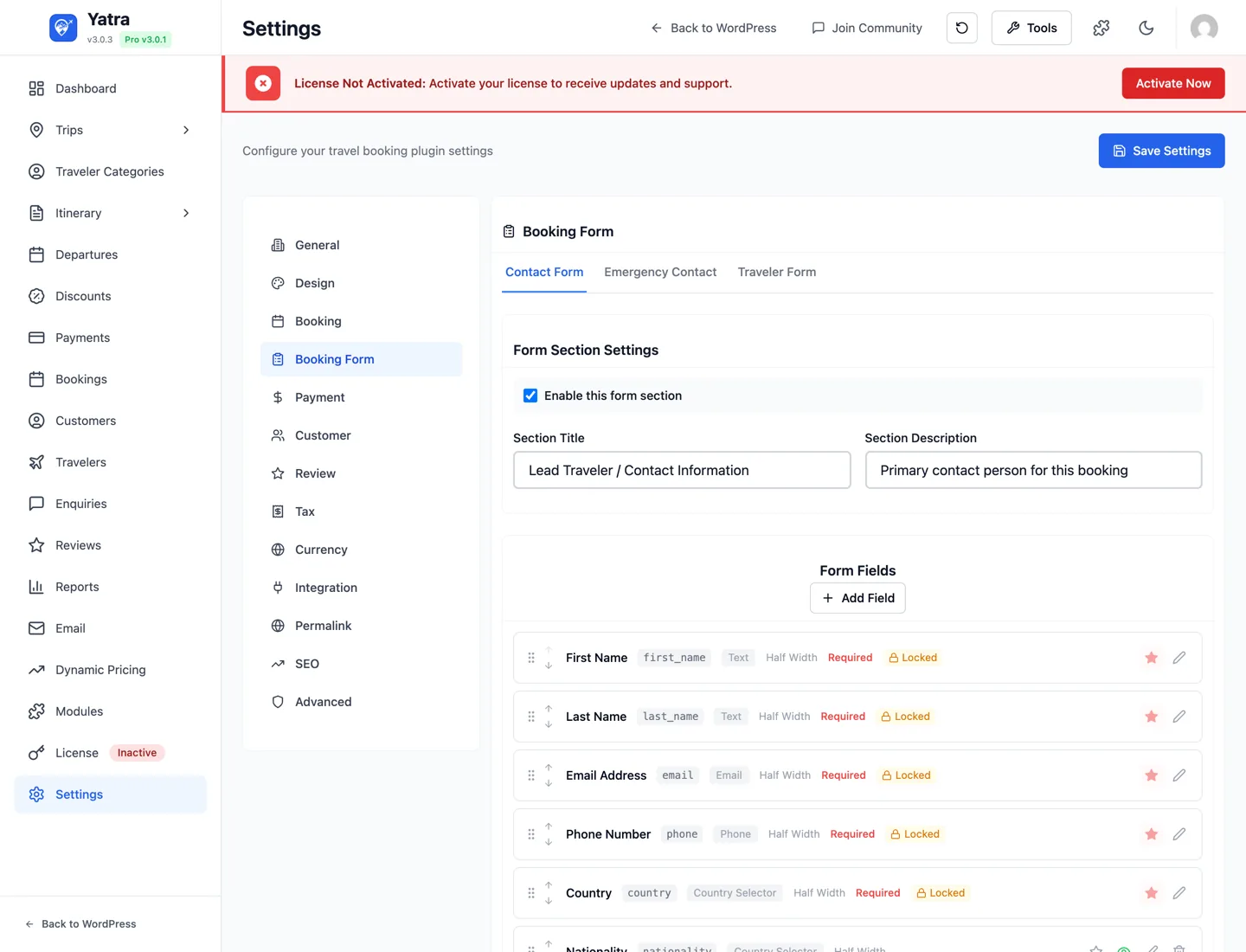
This tab renders the Booking Form Builder component — a drag-and-drop builder for the three sections of the public checkout: Lead Traveler / Contact Information, Emergency Contact, and Per-Traveler.
- The entire configuration is stored as one JSON blob under the
booking_form_configoption. - Defaults live in
SettingsService::getDefaultBookingFormConfig()— the lead-travelerfirst_name,last_name,email,phone, andcountryfields are locked: you can hide them but cannot remove them. - Field types supported:
text,email,tel,date,select(with options),country,textarea,number,checkbox, and Text Block (display-only — see below). - Per-field width:
full,half,third— controls how many fields sit on a row. - Each field has a Required toggle, Label text, Placeholder, and (for
select) an Options repeater. - Each section has its own on/off toggle. Turning a whole section off hides every field in it (including locked ones) from the checkout — see Turning sections on or off below.
Different forms for different trips
Need a Dietary requirements question only on food tours, or a shorter traveller form on day trips? With the Pro Dynamic Form Field module each form tab gets a Conditions button: a condition is a full alternative version of that form (title, description, fields) used on the trips it names. See Conditions — per-trip versions of a form below and Modules → Dynamic Form Field.
Text Block (display-only content)
Use a Text Block field to show read-only text between fields — booking instructions, a short policy note, a "Travellers" divider, a deposit reminder, etc. It is not an input: customers can't type in it, it's never required, it collects and stores nothing, and it never appears in emails as a value.
- Add it like any field, then drag it to sit between whichever fields you want.
- You only fill in Content and a Width — there's no label, field ID, placeholder, or Required toggle.
- Basic HTML is allowed in the content (bold, links, lists); plain text gets paragraph spacing automatically.
- It can go in any section (Contact, Emergency, or Per-Traveler). Placed in the Per-Traveler section it repeats once per traveler — handy for a per-traveller note, but keep that in mind.
Conditions — per-trip versions of a form PRO
With the Dynamic Form Field module on, the Form Section Settings card of every tab has a Conditions button. It opens a popup where each condition says "on these trips, use this version of the form":
| Part of a condition | What it holds |
|---|---|
| Use this form on | One picker, three groups: individual trips, trip categories (a trip in a sub-category also matches its parent categories) and trip types (single day / multi-day). Any match applies. At least one is required. |
| Form Section Settings | The section title and description shown to customers on those trips. |
| Form Fields | The complete field list for those trips, edited with the same controls as the global list: reorder, edit label / type / placeholder / width / required / Applies to / dropdown options, enable or disable, remove. Add from global form brings back a global field you removed; + Add Field creates a field that exists only in this condition. |
How it behaves:
- Add condition starts as a copy of the global form at that moment. From then on it is independent — renaming or reordering a global field does not change the copy. Reset to global form re-copies it.
- Conditions are checked top to bottom; the first match wins (use the ↑ ↓ arrows in a condition's header to change priority). Put a specific trip above a broad category.
- A trip that matches no condition uses the global form — exactly as before, so nothing changes until you add a condition.
- On the Contact form the five locked lead-traveller fields (
first_name,last_name,email,phone,country) stay locked inside every condition: they can't be removed, disabled or made optional. A condition that somehow lacks one gets it back at checkout. - The section's Enable this form section switch is global — a condition changes what a section asks, not whether it is shown.
- At checkout the trip's version is what is rendered, validated (a field not in the trip's version is never required) and stored. The booking detail screen and the admin booking form label fields from the trip's version too.
- Conditions are part of the booking form configuration and are saved with Save Settings. The section card lists each condition (On Trekking & Hiking → "Trekker details" · 5 fields) with an Edit shortcut and shows a count on the button.
- Disabling the module hides the button and stops the conditions applying; they stay in the saved configuration and apply again when it is re-enabled.
Turning sections on or off
Each of the three sections — Contact, Emergency, Per-Traveler — can be switched off entirely. Existing/un-customised sites have all three on, so nothing changes unless you turn one off.
A booking always needs an email — don't strand checkout
An email address is always required to complete a booking (it's used for the confirmation email, the customer account, and the voucher). The lead-traveler Email field lives in the Contact section and is locked — but you can still switch the whole Contact section off, which hides that email field too.
When the Contact section is off, Yatra recovers the email from the Per-Traveler form: it uses the first traveller that has a valid email and treats that traveller as the booking's contact (adopting their name and phone as well).
So if you turn the Contact section off, first add an email-type field to the Per-Traveler form. The default Per-Traveler form has no email field — if neither the Contact section nor the Per-Traveler form collects an email, no customer can check out (every attempt is rejected with "A valid email address is required to complete this booking").
The builder shows a banner when no section is set to collect an email — heed it. (The Emergency section never captures the booking email.)
5. Payment
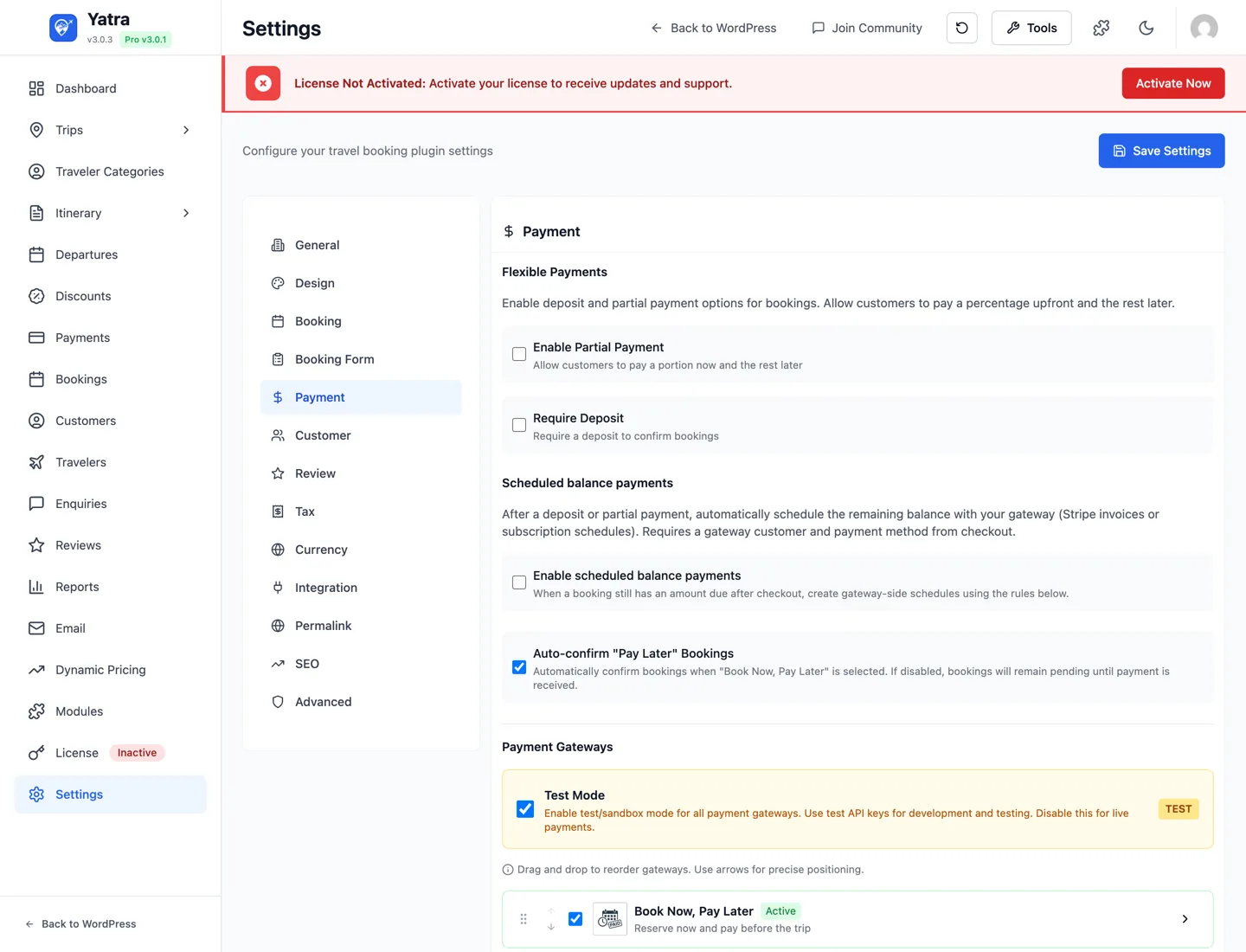
Test-mode, payment-flow toggles, and deposit / scheduled-payment behaviour. For per-gateway setup and the Payments admin page, see Payments.
Global
| Control | Setting key | Default | Notes |
|---|---|---|---|
| Test Mode | payment_test_mode | true | Master test-mode switch — applied to every gateway. Turn off when you go live. |
| Auto-Confirm Pay Later Bookings | auto_confirm_pay_later | false | Confirm "Pay Later" bookings immediately instead of leaving them in Pending. |
Partial Payments PRO
| Control | Setting key | Default | Notes |
|---|---|---|---|
| Enable Partial Payment | partial_payment | false | Customer pays a percentage at booking; rest collected later. |
| Partial Payment Percentage | partial_payment_percentage | 50 | Shown only when Enable Partial Payment is on. |
Deposit PRO
| Control | Setting key | Default | Notes |
|---|---|---|---|
| Require Deposit | deposit_required | false | Force a deposit at booking time. |
| Deposit Percentage | deposit_percentage | 25 | Shown only when Require Deposit is on. Percentage of the trip price taken upfront. |
Scheduled Payments PRO
| Control | Setting key | Default | Notes |
|---|---|---|---|
| Enable scheduled balance payments | enable_scheduled_payments | false | Master toggle for auto-charging the remaining balance on a future date. |
| Schedule type | scheduled_payment_type | single | single (one balance charge) or installments. |
| Days until first charge | scheduled_payment_days | 7 | How many days after booking to attempt the first charge. |
| Number of installments | scheduled_payment_installments | 3 | Shown only when type = installments. |
| Days between installments | scheduled_payment_interval | 30 | Shown only when type = installments. |
| Payment reminder (days before) | scheduled_payment_reminder_days | 3 | Reminder email this many days before the charge attempt. |
Gateways
The list of available gateways (PayPal, Pay Later — free; Stripe, Razorpay, Mollie, Paystack, Square, Authorize.Net, Bank Transfer — Pro) is rendered as a row of cards lower on the tab. Each card has an Enable toggle and a Settings button that expands the gateway's credentials form. Full per-gateway details: Payments.
Server-authoritative amounts (3.0.4+)
The POST /payment/create-intent endpoint ignores any client-supplied amount and recomputes from the booking row when a booking_id is provided. See Payments → security model.
6. Pricing PRO
Controls how the Advanced Discount module (group + coupon discounts) and the Dynamic Pricing module combine when both can fire on the same booking.
Conditional tab
This tab is only rendered when both the Advanced Discount module and the Dynamic Pricing module are enabled under Yatra → Modules. On installs that have only one (or neither) of those Pro modules on, the Pricing tab is hidden — the underlying setting still exists in wp_options but has no effect.
When the tab is visible, a status banner at the top reports the current state ("Active" — both modules enabled, your choice is being applied to every new booking) or which module(s) still need to be enabled before the choice takes effect.
Discount Stacking
| Control | Setting key | Default | Notes |
|---|---|---|---|
| Discount Stacking | discount_stacking_mode | both | One of four modes (below). Backend silently coerces any other value to both so a malformed POST can't change pricing behaviour. |
The four modes:
| Mode | Value | Behaviour |
|---|---|---|
| Both apply (default — legacy stacking) | both | Dynamic Pricing and the discount both apply against the trip's catalog price; the customer gets the larger combined saving. Matches the math every existing site uses today. |
| Best for the customer | best_for_customer | Calculates the booking total under "DP-only" and "discount-only" scenarios, then picks the cheaper for the customer. Never combines. |
| Discount only | discount_only | When a coupon or group discount is valid for the booking, Dynamic Pricing is skipped — the discount applies against the un-adjusted catalog price. |
| Dynamic Pricing only | dynamic_pricing_only | When a Dynamic Pricing rule reduced the trip price, any coupon / group discount is ignored for that booking. |
Default preserves legacy behaviour
After upgrading to a build that ships this setting, every site stays on Both apply (both). That's the math your sidebar already uses today: catalog price × Dynamic Pricing → customer-shown per-unit price; group / coupon discount % calculated against the original catalog base. Nothing changes until an operator explicitly switches modes.
How to choose a mode
- You're not sure / you don't want anything to change — leave it on Both apply. Same bottom-line math as before this setting existed.
- You want a single, easy-to-explain discount on the displayed price — pick Discount only. The customer sees the catalog price, the discount comes off that, and Dynamic Pricing operates as an internal pricing lever you don't need to expose.
- You only use Dynamic Pricing for occasional flash sales — pick Dynamic Pricing only. Coupon codes still work in normal periods; during a DP-driven sale they're blocked so customers can't double-dip.
- You want the strict customer-friendliest single discount — pick Best for the customer. Yatra computes both alternatives and silently uses whichever produces the lower total.
See Advanced Discount → How Dynamic Pricing and discounts combine for the fully-worked example showing the exact line-by-line numbers each mode produces.
7. Customer
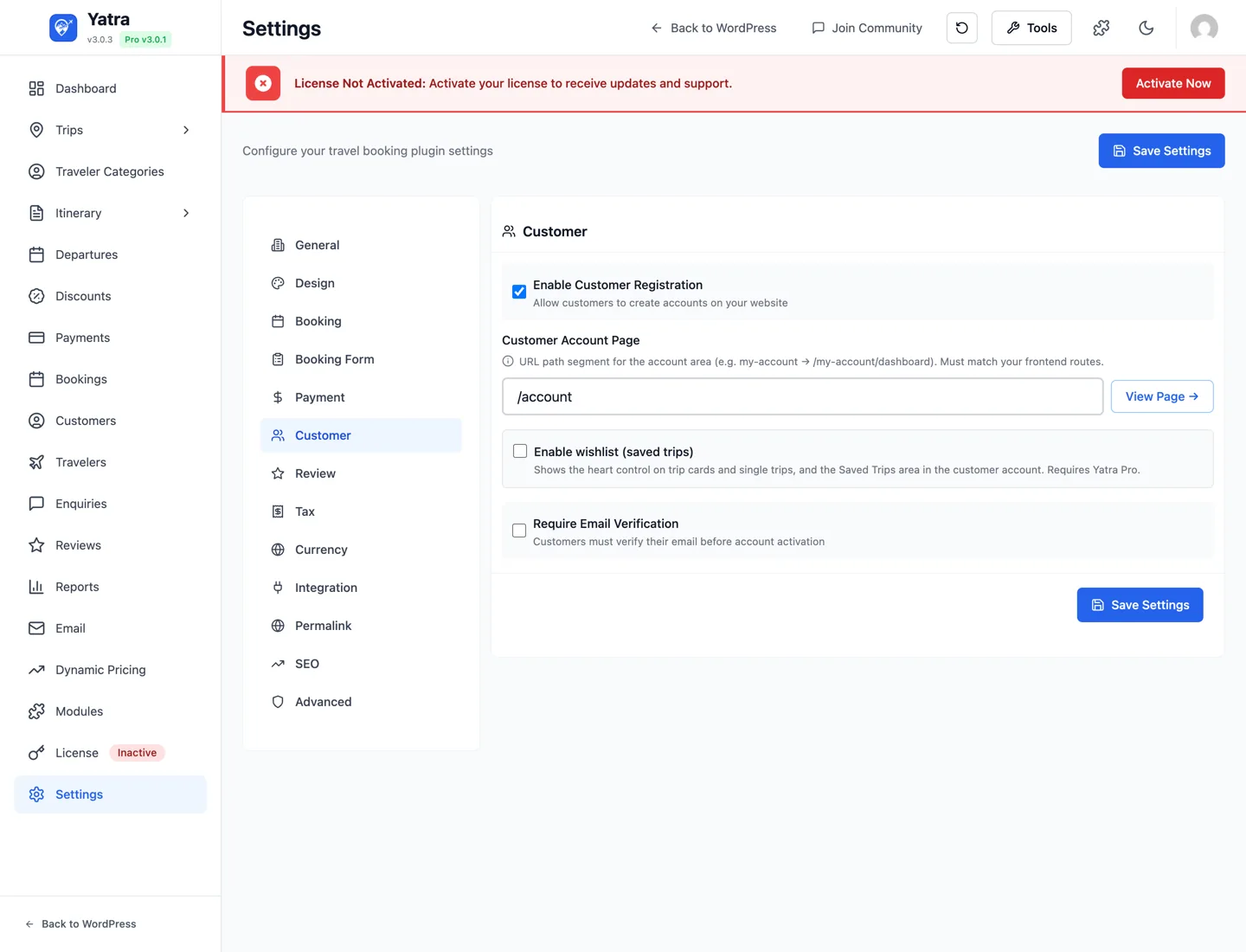
Account behaviour on the customer-facing site.
| Control | Setting key | Default | Notes |
|---|---|---|---|
| Enable Customer Registration | customer_registration | true | If off, only WP-admin-created accounts can log in. |
| Customer Account Page | customer_account_page | (empty) | URL path segment for the account area (e.g. my-account). A View Page button next to the field opens the page on the front-end. |
| Enable wishlist (saved trips) | enable_wishlist | false | Pro-only field. The control is only rendered when Pro is active (window.yatraAdmin.isPro === true). Without Pro, a "Saved Trips — Pro feature" call-out appears in its place. |
| Require Email Verification | require_email_verification | false | Customers must click the verification link before account activation. |
8. Review
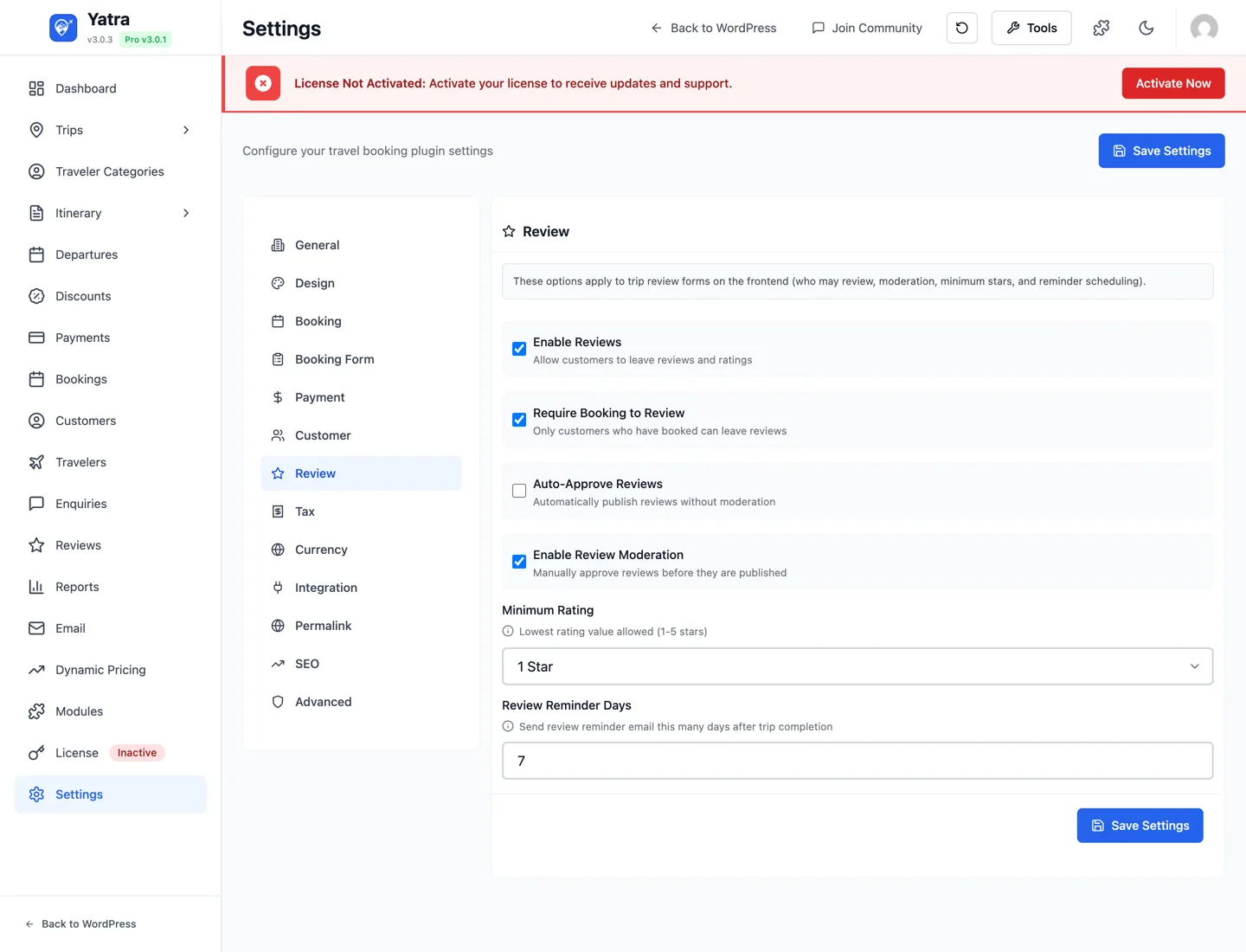
Trip-review form behaviour.
| Control | Setting key | Default | Notes |
|---|---|---|---|
| Enable Reviews | enable_reviews | true | Master toggle for the entire review system. |
| Require Booking to Review | require_booking | false | When on, only customers with a confirmed booking can leave a review. |
| Auto-Approve Reviews | auto_approve_reviews | false | Skip moderation queue. |
| Enable Review Moderation | review_moderation | true | Reviews go to a Pending queue (visible at Yatra → Reviews). |
| Minimum Rating | min_rating | 1 | Lowest star value the form accepts (1–5). |
| Review Reminder Days | review_reminder_days | 7 | Days after trip completion to email the Leave a review link. |
9. Tax
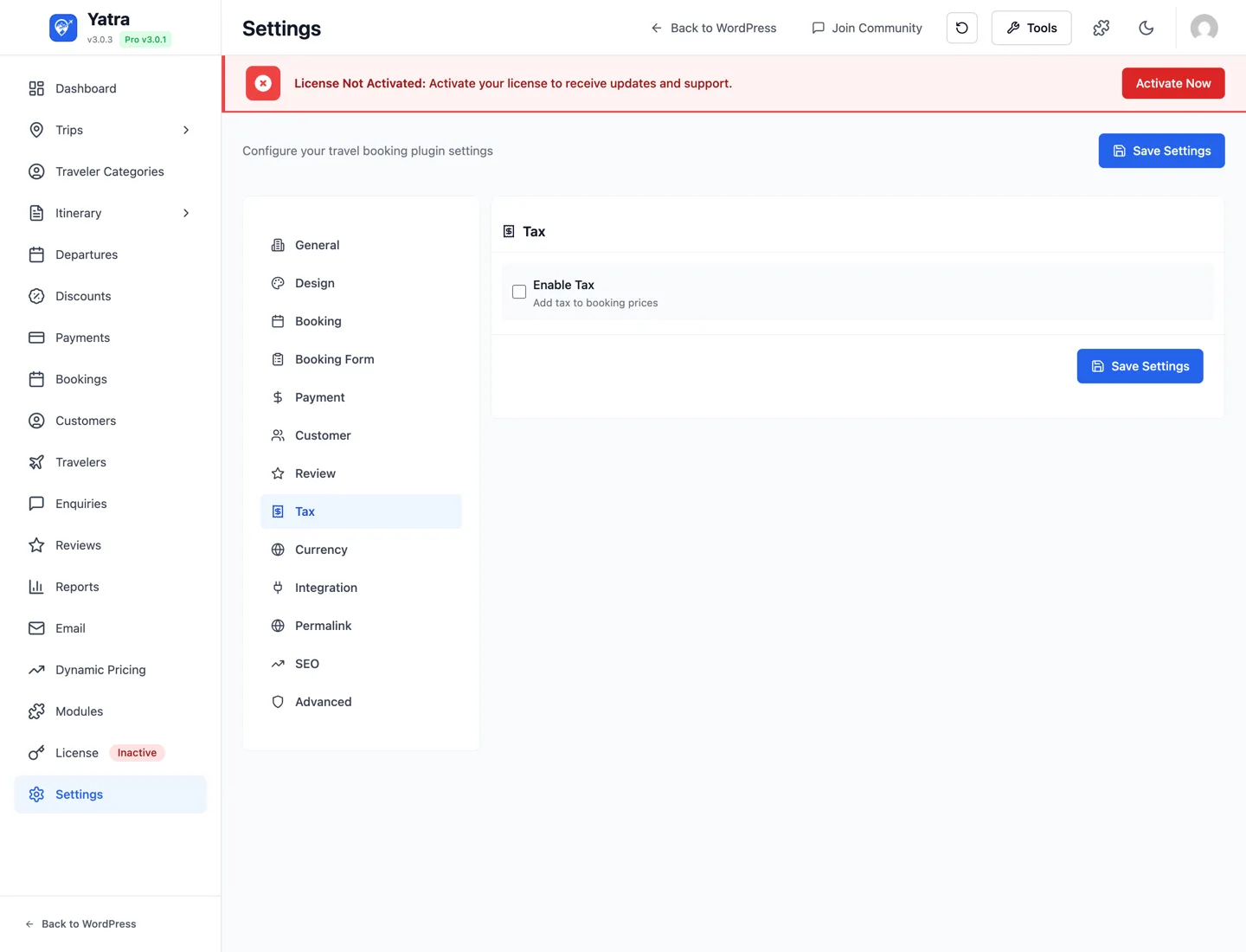
| Control | Setting key | Default | Notes |
|---|---|---|---|
| Enable Tax | enable_tax | false | Master toggle. The remaining controls only appear when this is on. |
| Taxes | multiple_taxes | [] | Custom repeater (the Multiple Taxes Editor component) of { name, rate } rows — e.g. { name: "VAT", rate: 20 }. Live total shown below the editor. |
| Tax Inclusive Pricing | tax_inclusive | false | When on, prices are displayed with tax already included. |
| VAT Number | vat_number | (empty) | Your tax ID; appears on invoices. |
Per-country tax (advanced)
The schema supports per-country tax bands (multiple_taxes_by_country) for site owners that need it. There's no UI yet — set the value via the REST API or a custom plugin if you need it today.
10. Currency
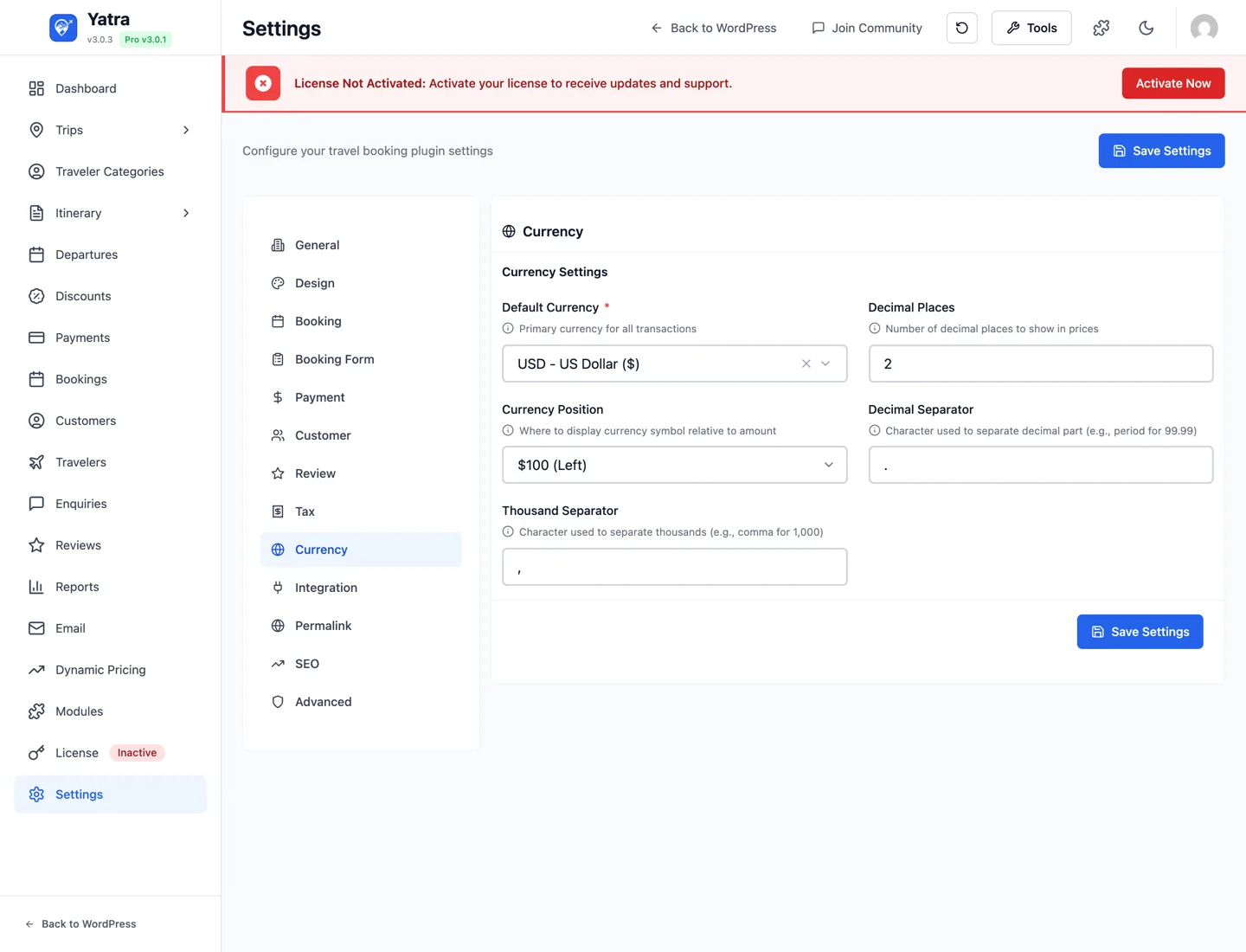
Display formatting for monetary values across the site.
| Control | Setting key | Default | Notes |
|---|---|---|---|
| Default Currency | currency | USD | Searchable dropdown of all ISO currency codes. Base for all transactions. |
| Currency Position | currency_position | left | left, right, left_space, right_space. Each option shows a live preview in the dropdown. |
| Thousand Separator | thousand_separator | , | Single character. |
| Decimal Separator | decimal_separator | . | Single character. |
| Decimal Places | currency_decimals | 2 | 0–4. Most fiat = 2; 0 for JPY / KRW. |
Multi-currency switching
Per-trip currency overrides and a customer-facing currency switcher are provided by Pro modules. The free schema stores only a single base currency.
11. Integration
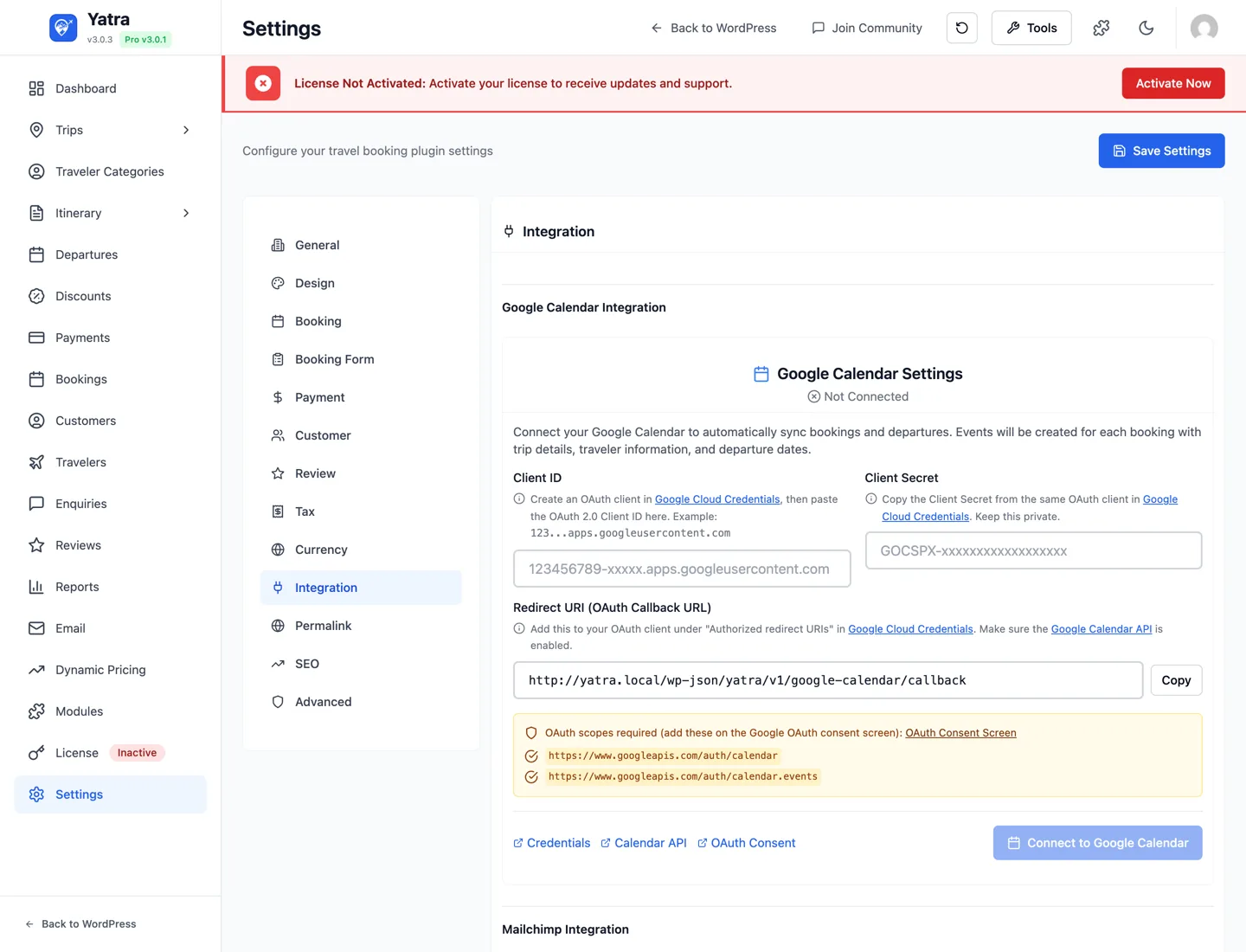
Configuration for built-in third-party integrations. Most blocks only appear when the matching Pro module is active (see Modules for the toggles).
Google Calendar PRO
Renders conditionally when the Google Calendar module is enabled. Exposes OAuth credentials, target calendar ID, and sync direction. See Modules → Google Calendar.
Mailchimp PRO
| Control | Setting key | Notes |
|---|---|---|
| Mailchimp API Key | mailchimp_api_key | Password-style input. Tested with a Verify button. |
| Audience / List | mailchimp_list_id | Dropdown populated after a successful API-key verification. |
| Sync customers on booking | mailchimp_sync_on_booking | Push booking customers as Mailchimp contacts. |
| Double opt-in | mailchimp_double_optin | Send a confirmation email before adding to the list. |
| Field mapping | mailchimp_field_mapping | Dynamic key/value mapping of Yatra fields → Mailchimp merge tags. |
| Add tags | mailchimp_add_tags | Tag synced contacts. |
| Default tags | mailchimp_default_tags | Comma-separated tag list applied to every synced contact. |
Facebook Pixel PRO
| Control | Setting key | Notes |
|---|---|---|
| Pixel ID | facebook_pixel_id | Your Meta Pixel ID. |
| Track ViewContent | fb_track_view_content | Per-event toggle. |
| Track InitiateCheckout | fb_track_initiate_checkout | Per-event toggle. |
| Track Purchase | fb_track_purchase | Per-event toggle. |
| Use Conversions API | fb_use_conversions_api | Server-side event posting in addition to the browser pixel. |
| Conversions API access token | facebook_access_token | Password-style input. Shown only when Use Conversions API is on. |
Google Analytics 4 Enhanced PRO
| Control | Setting key | Notes |
|---|---|---|
| Measurement ID | ga4_measurement_id | e.g. G-XXXXXXXX. |
| Track view_item | ga4_track_view_item | Per-event toggle. |
| Track add_to_cart | ga4_track_add_to_cart | Per-event toggle. |
| Track begin_checkout | ga4_track_begin_checkout | Per-event toggle. |
| Track purchase | ga4_track_purchase | Per-event toggle. |
| Use Measurement Protocol | ga4_use_measurement_protocol | Server-side event posting in addition to the browser tag. |
| Debug mode | ga4_debug_mode | Enables GA4 DebugView. |
| API secret | ga4_api_secret | Password-style input. Shown only when Measurement Protocol is on. |
reCAPTCHA
| Control | Setting key | Notes |
|---|---|---|
| Enable reCAPTCHA | recaptcha_enabled | Adds Google reCAPTCHA v3 to the public checkout / enquiry forms. |
| Site Key | recaptcha_site_key | From Google reCAPTCHA admin. |
| Secret Key | recaptcha_secret_key | Password-style input. |
For a full list of integrations and their setup guides, see Pro modules overview.
11. Permalink
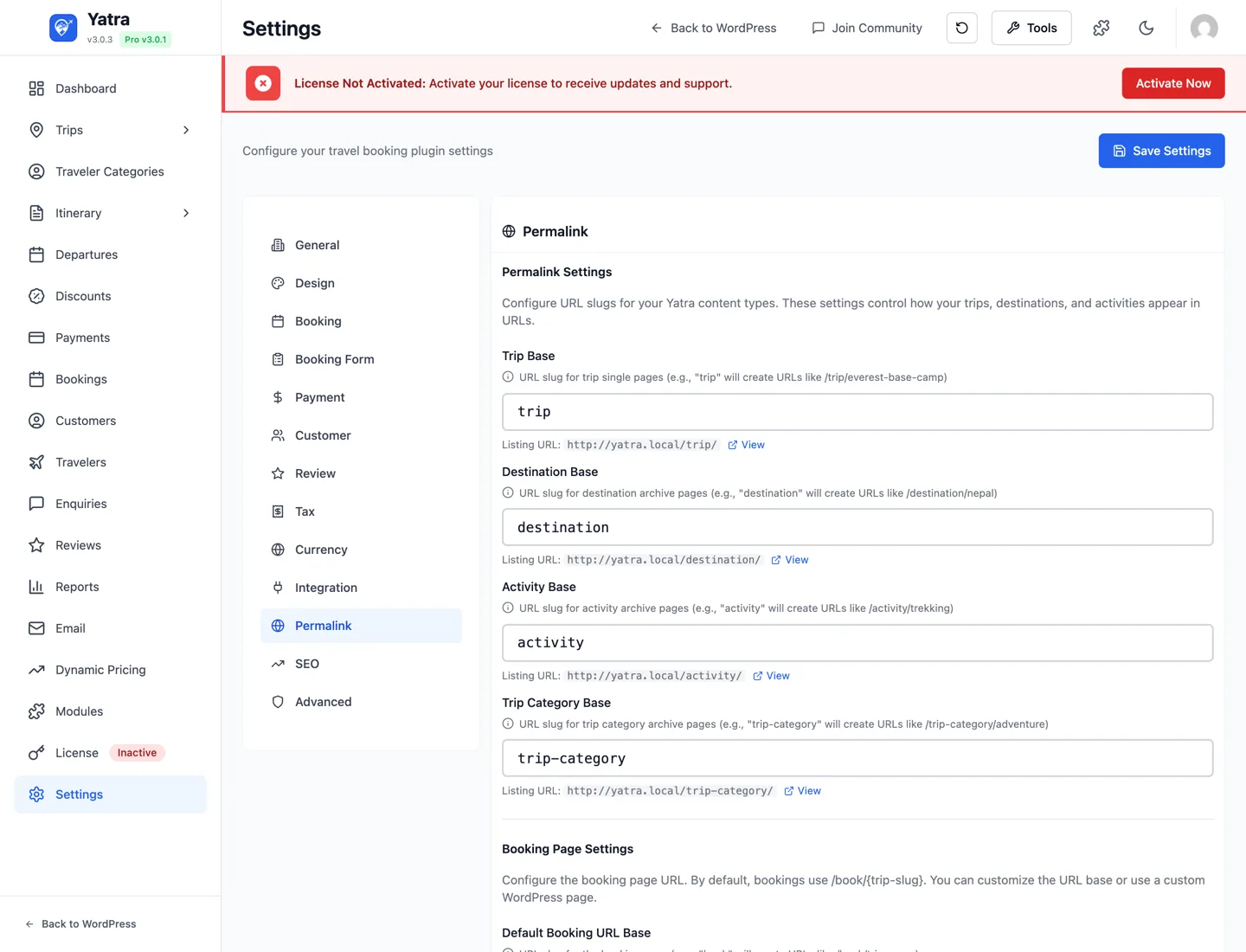
URL slugs for Yatra's content types. Changing any of these requires a rewrite-rule flush — Yatra triggers it automatically on save, but if you ever see 404s, visit Settings → Permalinks in WP-admin and click Save to force a flush.
| Control | Setting key | Default | Resulting URL example |
|---|---|---|---|
| Trip Base | trip_base | trip | /trip/everest-base-camp |
| Booking Base | booking_base | book | /book/everest-base-camp, /book/confirmation/ |
| Destination Base | destination_base | destination | /destination/nepal |
| Activity Base | activity_base | activity | /activity/trekking |
| Trip Category Base | trip_category_base | trip-category | /trip-category/adventure |
Live preview
Each input shows the resulting public URL beneath it, with a View link so you can verify the page renders before navigating away.
The whole permalink set passes through the yatra_permalink_bases filter — useful if you're enforcing localised slugs from a custom plugin. See Hooks & filters → Front-end routing.
Customer account URL lives elsewhere
The slug for the customer-account area is configured under Customer → Customer Account Page as customer_account_page — not on this tab. Older revisions of this page listed an account_base here; the source doesn't expose that field.
12. SEO
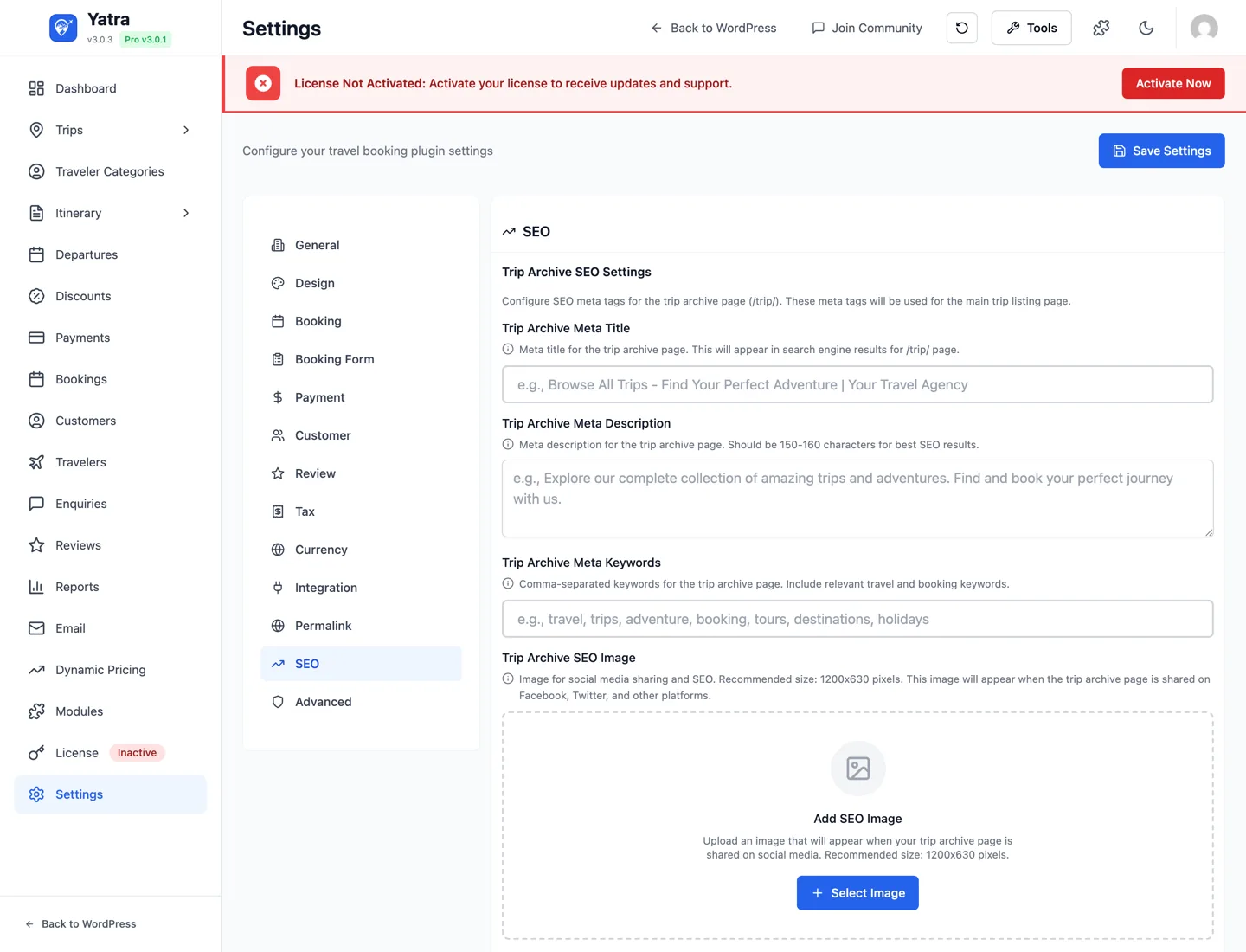
Meta tags for the trip archive page (/{trip_base}/).
| Control | Setting key | Notes |
|---|---|---|
| Trip Archive Meta Title | seo_trip_meta_title | Appears in <title> and search-result links for the trip archive. |
| Trip Archive Meta Description | seo_trip_meta_description | 150–160 characters recommended. |
| Trip Archive Meta Keywords | seo_trip_meta_keywords | Comma-separated. Most search engines ignore this; included for completeness. |
| Trip Archive SEO Image | seo_trip_meta_image | Stores the WP attachment ID. Recommended 1200×630 for OG / Twitter. Selector uses the WP media library. |
If you use Yoast / RankMath / SEOPress
Those plugins emit their own <title> and meta tags for the archive page and override Yatra's. Use Yatra's SEO tab only if no SEO plugin is active.
13. Advanced
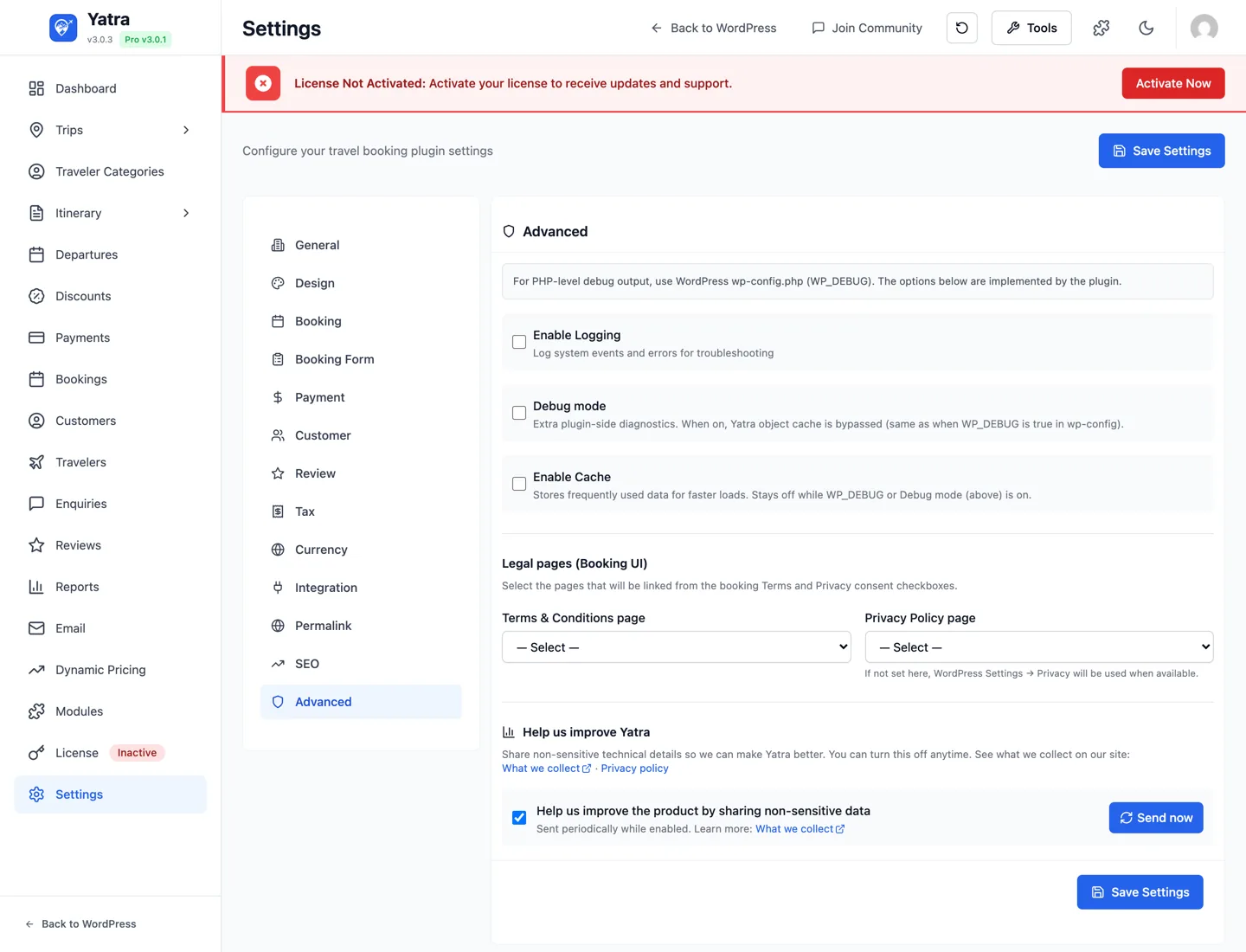
Diagnostics, caching, legal-page wiring, and telemetry.
Logging & debug
| Control | Setting key | Default | Notes |
|---|---|---|---|
| Enable Logging | enable_logging | false | Writes Yatra-specific events to the system logs (visible in Yatra → Tools → Logs). |
| Debug Mode | debug_mode | false | Plugin-side diagnostics. Bypasses the Yatra object cache while on (same effect as WP_DEBUG=true). |
| Enable Cache | cache_enabled | true | Yatra's internal cache layer. Auto-disabled while Debug mode or WP_DEBUG is on. |
Legal pages (Booking UI)
| Control | Setting key | Notes |
|---|---|---|
| Terms & Conditions page | terms_page_id | Dropdown of published WP pages. Linked from the I agree to terms checkbox in checkout. |
| Privacy Policy page | privacy_policy_page_id | Linked from the privacy-consent checkbox. Falls back to the WP Settings → Privacy page when blank. |
Telemetry (opt-in)
The Help us improve Yatra section enables anonymous usage tracking via the yatra_usage_tracking_enabled option. What gets collected is documented at wpyatra.com/what-we-collect/. It is off by default — switch it on to help the team prioritise features.
The endpoint behind it is POST /yatra/v1/usage-tracking.
Search & Listing
Controls the storefront trip search bar (the [yatra_search] form) and the filter sidebar on the trip listing page. In the admin this tab sits between Booking Form and Payment. Every option here defaults to the previous behaviour, so existing sites are unchanged until you opt in.
Search bar fields
Turn individual fields of the search bar on or off for a cleaner search. All default to shown.
| Control | Setting key | Default | Notes |
|---|---|---|---|
| Keyword search | search_show_keyword | true | Free-text "trip name or keyword" field. |
| Destination | search_show_destination | true | Destination dropdown. |
| Activities | search_show_activities | true | Activity dropdown. |
| Duration | search_show_duration | true | Trip-length range slider. |
| Budget | search_show_budget | true | Price-range dropdown. |
Hiding a field only removes it from the bar — searching by that criterion via a URL parameter still works.
Mobile filters
| Control | Setting key | Default | Notes |
|---|---|---|---|
| Collapse filters by default on mobile | collapse_filters_on_mobile | false | On screens ≤768px, the listing filter sections start collapsed so trip cards are visible immediately; visitors tap a section to expand it. Desktop is unaffected. Off by default, so existing sites keep today's expanded layout until you enable it. |
Reading settings programmatically
Every saved value is one WP option. You can read them anywhere with the SettingsService facade:
use Yatra\Services\SettingsService;

// Generic getters (return the schema default if the option is unset)
$currency      = SettingsService::getCurrency();
$timezone      = SettingsService::getString( 'timezone', 'UTC' );
$expiryHours   = SettingsService::getInt( 'booking_expiry_hours', 24 );
$reviewsOn     = SettingsService::isEnabled( 'enable_reviews' );

// Or fetch everything (for export / debugging)
$all = SettingsService::all();

// Force-reload from the database after an update_option() call
SettingsService::reload();
Or via REST (admin auth required):
curl -u "user:application-password" \
https://example.com/wp-json/yatra/v1/settingscurl -u "user:application-password" \
-H "Content-Type: application/json" \
-d '{"booking_expiry_hours":48,"availability_horizon_months":18}' \
https://example.com/wp-json/yatra/v1/settingsThe body is a flat map of setting keys (no settings wrapper). Invalid values are rejected per key with HTTP 400 — e.g. "Invalid value for setting: availability_horizon_months" for a horizon outside 1–36 — and the previously stored value is kept.
The REST endpoint also exposes POST /yatra/v1/settings/flush-rewrite-rules (re-flush WP rewrite rules without changing settings) and GET /yatra/v1/settings/pages (list candidate WP pages for the booking / account / TOS dropdowns). See REST API → Settings.
Pro settings (3.0.2+)
Yatra Pro adds its own REST endpoint at POST /yatra/v1/settings (overlaid on top of the free one) for Pro-specific keys. Since 3.0.2 the Pro endpoint whitelists which keys it will write — anything not in the schema is reported back in rejected_keys rather than silently overwriting wp_options.
If you write a custom Pro module that needs to expose a setting via this endpoint, register it via the filter:
add_filter( 'yatra_pro_writable_settings_schema', function ( array $schema ): array {
    $schema['my_module_enabled'] = static function ( $value ): bool {
        return (bool) $value;
    };

    $schema['my_module_api_key'] = static function ( $value ): string {
        return sanitize_text_field( (string) $value );
    };

    return $schema;
} );
The map is key => sanitiser-callable; the sanitiser must return the value to persist. See Hooks & filters → Payments for the full hook signature.
Where to go next
- Bookings & customers — the operator guide for the Bookings module.
- Payments — gateway setup, deposits, refunds.
- Email & notifications — transactional email templates and Pro automation.
- Modules — the catalog of Pro modules that surface controls on the Integration tab.
- REST API — full settings endpoint surface.
- Hooks & filters — every hook the settings system fires.