
All modules
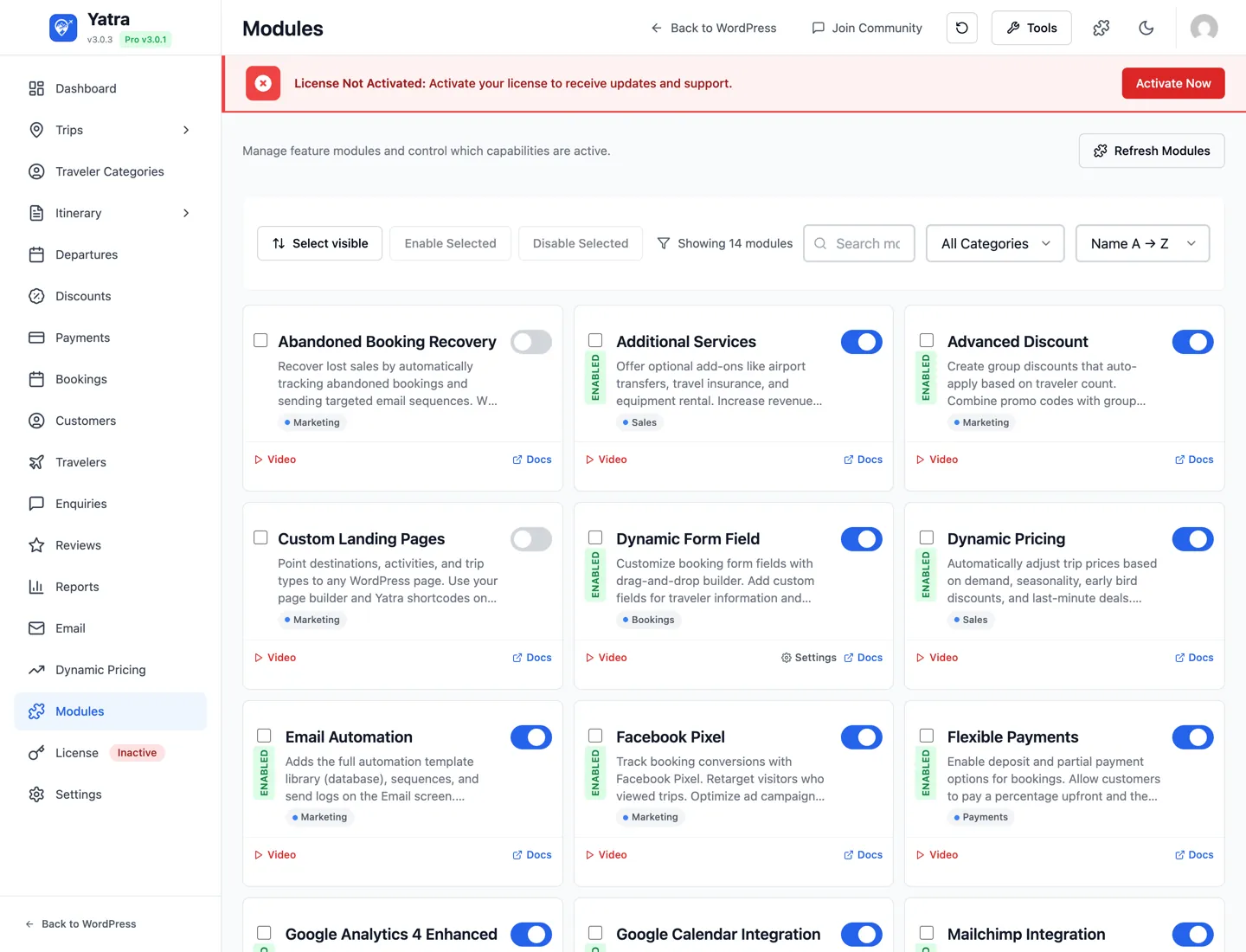
This is the flat catalog — every Yatra Pro module on a single page, plus the seven premium payment gateways unlocked by the same license. Use the Pro modules overview for grouped, narrative explanations.
About the wording: Yatra calls these modules in the admin (Yatra → Modules). The page is a card grid: each card shows the module name, a short description, the category badge, and an on/off toggle. Toggling is instant — no page reload required.
How the Modules screen is organized
Each card carries:
- Name + category badge (Marketing, Payments, Sales, Bookings, Operations, Integrations, Productivity, Communications, Distribution, Branding, Team).
- One-paragraph description of what the module unlocks.
- Tags — a short list of keywords used by the search box at the top.
- Enable toggle — flips state immediately and writes to
wp_options.yatra_modules. - "Settings" link (when applicable) — jumps straight to the module's settings tab once enabled.
Disabling a module hides its UI but keeps your data so re-enabling later restores everything.
Premium payment gateways
One Yatra Pro license unlocks seven premium gateways. (Bank Transfer moved to the free plugin in Yatra 3.2 — see Payments → Bank Transfer.) These don't appear on the Modules screen — they're enabled under Yatra → Settings → Payment (one toggle per gateway, plus the credentials form).
Stripe Pro
Cards, Apple Pay, Google Pay, SCA / 3-D Secure 2, on-page Payment Element. Saves card on file so Scheduled Payments can auto-charge the balance.
Setup guide →Razorpay Pro
Cards, UPI, netbanking, wallets — primary choice for Indian rupee bookings.
Setup guide →Paystack Pro
Cards, bank transfer, USSD, mobile money — primary choice for Nigeria, Ghana, Kenya, South Africa.
Setup guide →Square Pro
Cards via Square. Useful when you also take in-person payments using a Square POS terminal.
Setup guide →Authorize.Net Pro
Long-running US gateway with merchant-account workflows, AVS / CVV, and recurring tokens.
Setup guide →Sales modules
Dynamic Pricing Pro
Automatically adjust trip prices based on demand, seasonality, early-bird discounts, and last-minute deals. Stacking rules + audit log.
Details →Additional Services Pro
Offer optional add-ons like airport transfers, travel insurance, and equipment rental — per trip or globally. Quantity controls + line items on bookings.
Details →Payment modules
Flexible Payments Pro
Take a deposit or percentage at booking time and collect the balance later. Per-trip override on the Trip Builder's Advanced section.
Details →Scheduled Payments Pro
Auto-charge the remaining balance on a future date using the saved payment method. Works with Stripe and other supported gateways.
Details →Marketing modules
Email Automation Pro
Adds the full automation template library, sequences, and send logs on the Email screen. (The four core customer templates — booking, payment, cancellation, reminder — are free without this module.)
Details →Abandoned Booking Recovery Pro
Track abandoned bookings and send a multi-step email sequence with personalized recovery links. Recovered-revenue reporting included.
Details →Advanced Discount Pro
Group-size discounts that auto-apply based on traveler count, plus stacking rules and richer UI on top of the free Discounts feature.
Details →Mailchimp Integration Pro
Sync customers to Mailchimp lists when they book. Tag based on trips booked. Build targeted campaigns and nurture leads.
Details →Facebook Pixel Pro
Browser + server-side Conversions API tracking of PageView, ViewContent, InitiateCheckout and Purchase, with per-event toggles.
Details →Google Analytics 4 Enhanced Pro
GA4 ecommerce events for view_item / add_to_cart / begin_checkout / purchase. Server-side tracking via Measurement Protocol.
Details →Custom Landing Pages Pro
Point destinations, activities, and trip categories at any WordPress page. Use your page builder + Yatra shortcodes; catalog links use the page URL when the module is on.
Details →Booking & operations modules
Dynamic Form Field Pro
Drag-and-drop booking-form builder — text / select / checkbox / date / country fields, per-section toggles — plus per-trip versions of each form (conditions by trip, category or trip type).
Details →Trip Consent Pro
Digital waivers, COVID forms, image-release consents — emailed once a booking is confirmed (with reminders) and signed online, not at checkout. Bookings show a consent signed status.
Details →Google Calendar Integration Pro
Push confirmed bookings to Google Calendar (one-way) — one event per booking, or one per departure. All bookings go to the one calendar you pick; automatic re-sync.
Details →Growth + Scale modules
Modules unlocked by the Growth and Scale plans. AI Assistant and WhatsApp are bring-your-own-credentials integrations — no per-call markup, no proxying.
AI Assistant Pro
Bring-your-own OpenAI / Anthropic key. Inline sparkle affordances across the trip editor, SEO fields, taxonomy descriptions, and the enquiry inbox. Daily AI digest on the dashboard. From Pro 3.2, an MCP server lets Claude, Cursor and other AI assistants work with your bookings and trips.
Details →Multi-Trip Cart Pro
New in Pro 3.2. Customers add several trips and dates to a cart and book them in one checkout with one payment. Each trip becomes its own booking. Needs Yatra 3.2+.
Details →Currency Switcher Pro
New in Pro 3.2. Visitors see trip prices in the currency they choose while browsing; checkout, payments, emails and the admin stay in your store currency. Optional daily rates. Needs Yatra 3.2+.
Details →WhatsApp Notifications Pro
Transactional WhatsApp messages via Meta's Cloud API — booking confirmations, payment receipts, T-1 reminders, review requests. Inbound replies are logged (STOP opts out). Public click-to-WhatsApp widget.
Details →Scale-only modules
Modules gated to the Scale tier (Yearly or Lifetime). Built for resellers and high-volume operators.
Channel Manager Scale
Sell your trips on GetYourGuide through its Supplier API (rebuilt in Pro 3.2): GetYourGuide checks availability on your site and sends reservations and bookings in real time, sharing one inventory with direct bookings. GetYourGuide must certify the connection from your partner account before you go live. Viator is in development.
Details →White Label Scale
Rebrand the entire admin — logo, name, primary color, sidebar menu (rename / reorder / hide / re-icon / promote), theme surfaces, PDFs. Remove every Yatra / MantraBrain reference your clients see.
Details →Webhooks Scale
Signed outbound HTTPS webhooks for booking, payment, enquiry and reminder events — send them to any CRM, Zapier / Make, Slack or custom receiver. HMAC signatures, retries and a delivery log.
Details →Team & Access Scale
Role-based access control for staff — granular capabilities, an audit log and email invitations to add team members.
Details →How a module turns on
- Install Yatra Pro alongside the free Yatra plugin.
- Activate your license in Yatra → License.
- Open Yatra → Modules, find the module (use the search box at the top), click its toggle.
- The card flips state immediately. Any new admin menus / settings tabs the module needs appear on the next page load.
- For payment gateways, also toggle them on under Yatra → Settings → Payment and fill in the credentials.
Source of truth: the module registry lives in
app/Core/Modules/ModuleManager.php. State is persisted in theyatra_modulesWordPress option.
The full module list at a glance
22 modules: 14 on every Pro plan (Starter, Growth, Scale), 4 on Growth and Scale, 4 on Scale only.
| Module | Tier | Category | Settings page after enable |
|---|---|---|---|
| Google Calendar Integration | Starter + | Integrations | yatra-google-calendar |
| Additional Services | Starter + | Sales | yatra-additional-services |
| Trip Consent | Starter + | Operations | yatra-trip-consent |
| Email Automation | Starter + | Marketing | email-automation |
| Dynamic Form Field | Starter + | Bookings | yatra-settings |
| Advanced Discount | Starter + | Marketing | (extends existing Discounts) |
| Mailchimp Integration | Starter + | Marketing | yatra-mailchimp |
| Facebook Pixel | Starter + | Marketing | yatra-facebook-pixel |
| Google Analytics 4 Enhanced | Starter + | Marketing | yatra-google-analytics |
| Flexible Payments | Starter + | Payments | yatra-settings |
| Scheduled Payments | Starter + | Payments | yatra-settings |
| Dynamic Pricing | Starter + | Sales | dynamic-pricing |
| Custom Landing Pages | Starter + | Marketing | yatra-settings |
| Abandoned Booking Recovery | Starter + | Marketing | abandoned-recovery |
| AI Assistant | Growth + | Productivity | ai-assistant |
| Currency Switcher | Growth + | Sales | Settings → Currency |
| Multi-Trip Cart | Growth + | Sales | (no settings — creates a Cart page) |
| WhatsApp Notifications | Growth + | Communications | whatsapp |
| Channel Manager | Scale | Distribution | channel-manager |
| White Label | Scale | Branding | white-label |
| Webhooks | Scale | Integrations | webhooks |
| Team & Access | Scale | Team | team |
Where to read more
- Pro modules overview — grouped by what they do, with narrative setup steps.
- Payments & gateways — gateway-by-gateway credentials and checkout behaviour.
- Email & notifications — Pro email automation details.
- Pricing — pick the plan that includes the modules you need.