
Flexible Payments PRO
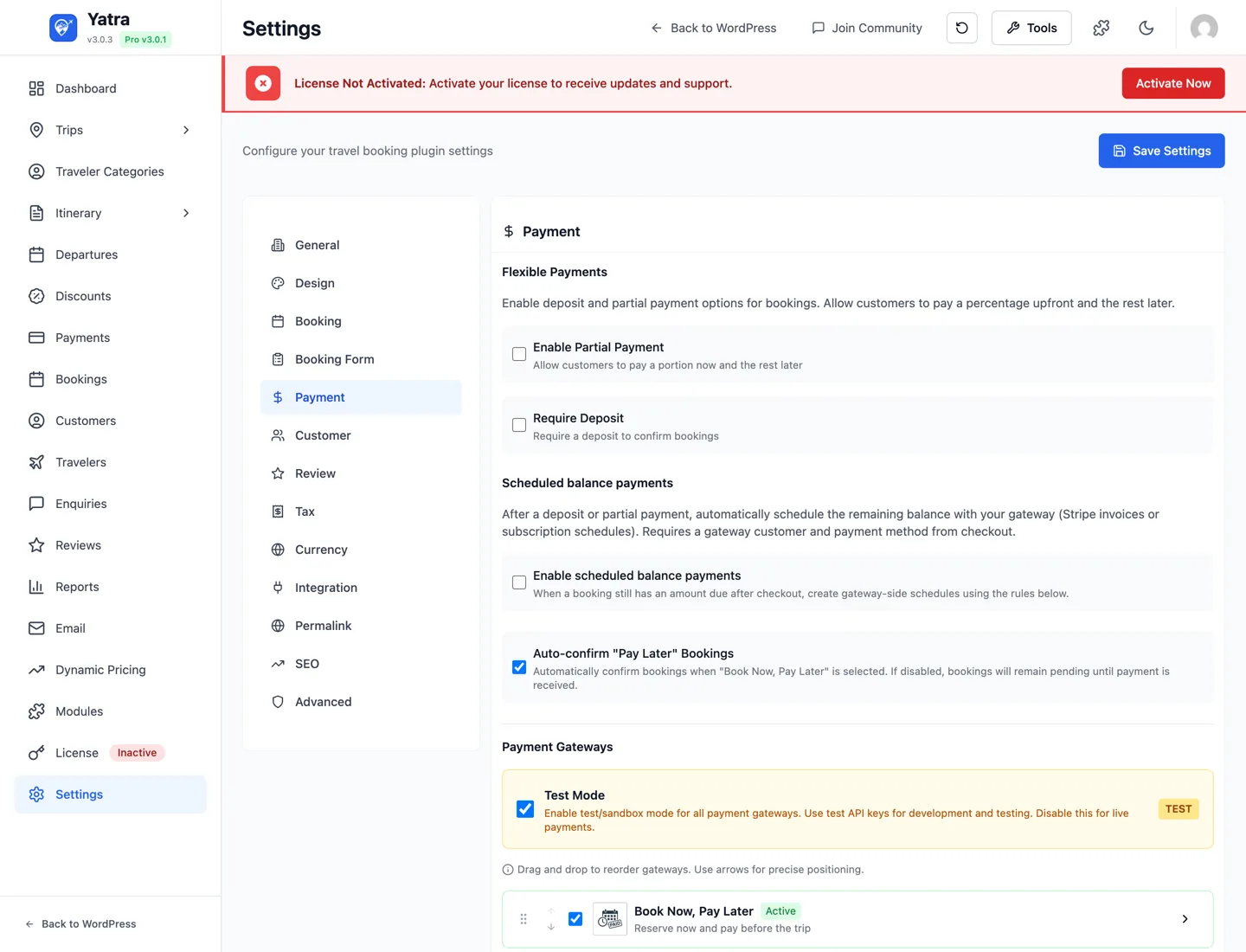
Take a deposit or a partial payment at booking time instead of demanding the full amount upfront. The customer reserves their seat with the smaller charge and pays the balance later — either manually from My Account, via a one-click "pay balance" link you email them, or automatically with the companion Scheduled Payments module.
Deposit vs Partial — which one do I want?
Both options offer the same outcome (customer pays part now, the rest later) but they're aimed at different business models. Pick one — or enable both and let the customer choose.
| Aspect | Deposit | Partial |
|---|---|---|
| Mental model | "Secure your spot with a deposit" | "Split your payment flexibly" |
| Configured how | Site-wide and per-trip | Site-wide only |
| Absolute amount possible? | ✅ "always $200, regardless of total" | ❌ percentage only |
| Per-trip percentage? | ✅ trip A can be 10%, trip B 30% | ❌ one site-wide percentage |
| Booking-form label | Pay 25% Deposit or Pay $200 Deposit | Pay 50% Now |
| Booking-form description | Pay deposit now, rest later | Partial payment option |
| Best for | High-ticket trips, expensive expeditions, group bookings, anywhere you want a per-trip lever | Sites with one consistent split (e.g. always 50/50) where simplicity beats per-trip control |
| Customer flow after | Identical — both create a partial-status booking with a Pay balance link in My Account | Identical |
Why we keep both
A common question — "they look the same, why ship two?" Two reasons.
- Pricing strategy. "Pay 25% deposit" reads as a deposit to lock something in. "Pay 50% now" reads as a split payment. Different psychology, different conversion rates, different markets. Some operators want one, some the other.
- Per-trip flexibility. Deposit has dedicated columns on the trip row (
deposit_amount,deposit_percentage,payment_terms) — so a 14-day Himalayan trek can demand$500while a half-day city tour demands15%. Partial is intentionally one global knob — fewer levers, less to misconfigure.
If you want per-trip control: Deposit. If you want one simple split across the whole catalogue: Partial.
What you'll need
| Thing | Where to get it |
|---|---|
| Yatra Pro license | Yatra → License |
| Flexible Payments module enabled | Yatra → Modules → Flexible Payments |
| A working payment gateway | PayPal or any Pro gateway. See Payments. |
Step 1 — Enable the module
- Open Yatra → Modules.
- Find Flexible Payments → toggle on.
- The Partial Payment and Deposit sections under Settings → Payment become editable; the Deposit & Payment Terms section on the Trip Edit screen unlocks.
Discoverability for free-plugin users
Even when Flexible Payments isn't active, the Trip Edit form still shows the "Deposit & Payment Terms" section with a PRO badge and an Upgrade to Pro / Activate module CTA — fields are read-only. So operators on the free plugin can see the feature exists; nothing they type into it would affect checkout while the module is off.
Step 2 — Configure site-wide defaults
Open Yatra → Settings → Payment.
Partial Payment
| Field | Setting key | Notes |
|---|---|---|
| Enable Partial Payment | partial_payment | Master toggle. Adds a Pay X% Now radio next to Pay in Full on the booking form. |
| Partial Payment Percentage | partial_payment_percentage | Default 30. Customer pays this % at checkout, the rest is recorded as the remaining balance. |
Deposit
| Field | Setting key | Notes |
|---|---|---|
| Enable Deposit | deposit_required | Master toggle. Adds a Pay X% Deposit radio next to Pay in Full on the booking form. |
| Deposit Percentage | deposit_percentage | Default 20. Used when a trip has no per-trip override. |
Both radios are opt-in for the customer — they're shown alongside Pay in Full and the customer picks. Neither setting forces a deposit-only flow.
Step 3 — Per-trip Deposit override (optional)
Per-trip overrides exist only for Deposit, not for Partial.
- Open a trip → Pricing tab.
- Scroll to Deposit & Payment Terms.
- Fill in any combination of:
- Deposit Amount — absolute amount in your store currency (e.g.
200for a flat $200 deposit). - Deposit Percentage — percentage of trip total (e.g.
15). - Payment Terms — free-text instructions shown on the booking confirmation (e.g. "Balance due 30 days before departure"). Not enforced by code; it's a customer-facing note.
- Deposit Amount — absolute amount in your store currency (e.g.
Resolution order when a customer picks the deposit option on a trip:
- Per-trip
deposit_amount(absolute) wins if> 0. Capped at the trip total. - Per-trip
deposit_percentagewins if> 0. - Site-wide
deposit_percentagefrom Pro settings (only consulted ifdeposit_requiredis on). - Upstream default (typically the full price).
Worked examples on a $1,000 trip:
| Trip configuration | Customer charged at checkout |
|---|---|
deposit_amount = 200 | $200 |
deposit_percentage = 15, no amount | $150 |
| both set | $200 (amount wins) |
| both empty, site-wide = 20% | $200 |
| both empty, site-wide deposit off | full $1,000 (deposit option won't appear) |
Step 4 — Verify the customer experience
- Open a trip in a private window → Book Now.
- On the booking summary you should see, depending on what you configured:
- Pay in Full (always)
- Pay X% Deposit or Pay $X Deposit — the X reflects per-trip values if set, otherwise the site-wide percentage.
- Pay X% Now — only when Partial is enabled site-wide.
- Pick one of the smaller options. The order summary refreshes:
- Net Amount = full trip price.
- Due Now = the deposit/partial amount.
- Complete payment.
- On the booking detail page you should see:
- Amount Paid = the deposit / partial amount
- Remaining Balance = the rest
- Payment Status =
partial

How the balance gets collected
Identical mechanism for Deposit and Partial — both create a booking in partial status.
| Approach | What happens |
|---|---|
| Customer self-serve | They open My Account → Bookings, click Pay balance on the row, and complete the second charge. Yatra flips the status to Paid. |
| Token link in email | Every partial booking gets a /{remaining_checkout_prefix}/{token}/ URL (default prefix: pay-balance). Email it manually, or let Yatra's transactional emails do it. Customers don't need to be logged in to use this link. |
| Automated | Enable Scheduled Payments. It auto-charges the saved card on a date you configure (e.g. 14 days before travel). Required: the gateway used for the first charge supports off-session payments (Stripe, PayPal Vaulting). |
The payment_terms per-trip text isn't enforced by code — it's a customer-facing note rendered on the booking confirmation. If you need an enforced due date for the balance, use Scheduled Payments.
Deposits disappear close to departure (tour-anchored balances)
When Scheduled Payments is set to the tour-date anchor (e.g. balance due 14 days before the tour), a customer booking inside that window is charged 100% up front — the deposit and partial options are hidden at checkout, because there's no time left to collect a balance. This is automatic; you configure the window in Scheduled Payments.
Common patterns
| Goal | Settings combo |
|---|---|
| Soft incentive — give customers a choice of full or 30% | Partial Payment on, 30%, Deposit off |
| Hard incentive on every trip — 20% deposit | Deposit on, 20%, Partial off |
| Flat $200 deposit per trip regardless of total | Deposit on at any % (so the option appears); per-trip deposit_amount = 200 on each trip you want this on |
| Different deposit per trip type (10% day tours, 30% multi-day) | Deposit on at site-wide 10%; per-trip deposit_percentage = 30 on multi-day trips |
| Deposit + auto-charge the rest 30 days before travel | Deposit on + Scheduled Payments configured for 30d |
Troubleshooting
The deposit/partial radio doesn't appear on the booking page
- Module enabled? Yatra → Modules → Flexible Payments.
- The corresponding master toggle on? Deposit needs
deposit_requiredOR a per-trip value; Partial needspartial_payment. - For Deposit only: if both the global flag and per-trip fields are empty, the radio is intentionally hidden.
Per-trip values aren't sticking after I save the Trip Edit form
- The free plugin's
TripValidatorallowlists these fields, but only on free 3.0.5+. Earlier versions silently dropped them. Update the free plugin first, then Pro.
Booking status stuck on partial after the second payment
- Confirm the booking's
amount_paidmatchestotal_amount. Yatra flips topaidonly when they're equal. If you marked a cash payment manually, double-check the amount on the Payments admin entry.
Deposit field says "PRO" and won't let me type even though Pro is installed
- The module is installed but not enabled. Yatra → Modules → toggle Flexible Payments on. Reload the trip edit page.
My customers want to pay the balance but the "Pay balance" link returns a 404
- Check the prefix under Settings → Permalinks. The default is
pay-balance. If you've customised it and not flushed rewrites, do Settings → Permalinks → Save once.
Legacy: the standalone Yatra Partial Payment plugin
If you ran Yatra 2.x you may have a standalone plugin called Yatra Partial Payment (wp-content/plugins/yatra-partial-payment/). It used different option keys (yatra_first_installment_payment*) and stored a payment_type = 'partial' post-meta value. From Yatra 3.x onward, that plugin's behaviour is superseded by this module — it is no longer wired into the booking flow and can be deactivated. Its database options are harmless to leave in place; if you want a clean state, delete options matching yatra_first_installment_payment% after migrating.
Useful links
- Payments — gateway-by-gateway setup that powers the deposit charge.
- Settings → Payment — full field reference for both sections.
- Scheduled Payments — companion module that auto-charges the balance.
- Hooks & filters → Flexible / Scheduled Payments — developer customisation.
Where to read more
- All modules — module catalog.