
Departures
A departure is one scheduled run of a trip — a date (and optionally a time) with its own capacity and an optional price override. The Departures admin is the operator's day-to-day view: who's booked on what date, which dates are filling up, what's coming up next week.
Departures vs Availability
Departures and the Availability system are connected but not the same thing:
- Availability is the rule engine (manual dates, recurring rules, trip default) that decides which dates appear on the customer's date picker.
- Departures is the operator view of every scheduled run — a flat list across all trips, filterable by status, with quick links to the bookings on each departure.
You don't have to manage both. If you're using Availability Dates / Rules per trip, the Departures page auto-shows them.
The Departures list
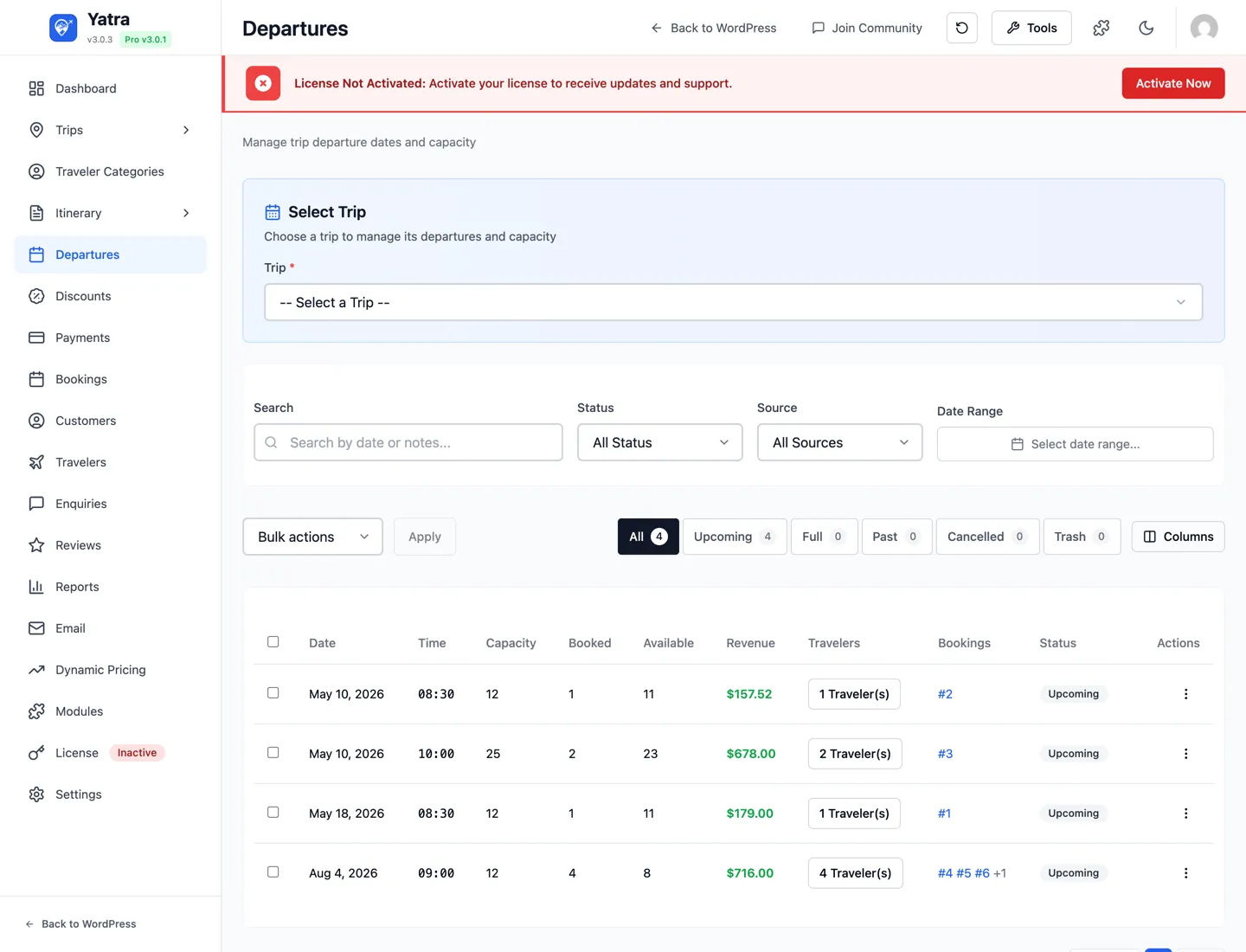
Open Yatra → Departures.
Status filter pills
Four lifecycle statuses + All, with live counts beside each label:
| Pill | What's in it |
|---|---|
| All | Everything except trash. |
| Upcoming | Every departure whose date is today or later — regardless of capacity (available, partially booked, or full). |
| Past | Departures whose date is in the past. |
| Cancelled | Manually cancelled departures (kept for reporting + refund auditing). |
| Trash | Soft-deleted rows. Restore or permanently delete from here. |
Status is about when a departure runs. Whether it still has seats is a separate question — use the Availability filter below for that. A sold-out departure stays in Upcoming; it no longer drops out of the list just because it filled up.
Availability filter
Next to the Status filter, Availability narrows the list by capacity and combines with whichever status pill is active:
| Option | What's in it |
|---|---|
| All Availability | No capacity filter (default). |
| Available | Departures with at least one seat free — unbooked or partially booked. |
| Partially Booked | Departures with some bookings but seats still free. |
| Full | Departures at or over capacity. |
Availability is computed live from the booked count against the departure's capacity, so it is accurate even before the daily status maintenance has run. Pick Upcoming + Full to see every future departure that has sold out, or Upcoming + Available for what you can still sell.
The old "Active / Archived" wording
Earlier doc revisions described departure statuses as Active / Archived / Cancelled, and later ones listed Full as a status. The current admin uses Upcoming / Past / Cancelled / Trash for status — auto-computed from the date, not a manual field — with capacity handled by the separate Availability filter.
Search
Search matches the departure date — start or end, so 2026-09 finds every September departure and a full 2026-09-14 finds that day — and free-text in the notes field. It combines with the Status and Availability filters, and the tab counts and pagination follow the search. (It does not match the trip title; pick a trip from the trip selector to narrow by trip.)
Column visibility
Toggle which columns appear via the column picker; choices are saved per-browser to localStorage under yatra_departures_visible_columns. Available columns:
- Trip — title + small chips for destination / activity / categories.
- Date — formatted, with the day of week.
- Time — only shown for departures that have one set.
- Max capacity — total seats.
- Booked — confirmed bookings on this departure.
- Available —
capacity − booked(or "—" for cancelled). - Price override — shown when set; falls back to the trip's normal price otherwise.
- Status — coloured badge.
- Created — when the row was added.
Bulk actions
Tick rows and pick:
| Status view | Available actions |
|---|---|
| Default | Cancel, Move to Trash, Delete permanently |
| Trash | Restore, Delete permanently |
Add a departure
Open the Departures list and click + Add Departure, or jump to a specific trip → Availability tab → + Add Date. Both lead to the same form, with the Trip field pre-filled when launched from a trip.

| Field | Required | Notes |
|---|---|---|
| Departure Date | ✅ | The day the trip actually runs. Date picker disallows past dates by default. |
| Departure Time | — | Time picker. Only set this when the trip has multiple departure times on the same date (e.g. a day-tour with morning + afternoon slots). |
| Max Capacity | ✅ | Total seats for this specific departure. Independent from the trip's overall Max Travelers. |
| Price Override | — | Currency amount. When set, overrides the trip's regular price for this date only. Useful for holiday surcharges or flash sales. |
| Notes | — | Internal-only — never shown to customers. Useful for "Lead guide: Sarah" or "Bus contracted from XYZ rentals". |
When you save, the departure becomes part of Availability Layer 1 (Manual Dates) — it overrides any recurring rule that covers the same date.
Why no Trip dropdown?
The Add Departure form takes the trip from the URL (?trip_id=…). To create a departure across multiple trips, repeat the form for each one. Or set up a Recurring Rule per trip if the schedule is regular.
The departure detail page
Click any row in the Departures list (or go to action=view&id=…).
Top — quick stats
A three-tile summary card:
- Booked — number of confirmed bookings.
- Available — remaining seats.
- Capacity — the total.
When booked == capacity the Full badge is shown next to the date.
Bookings on this departure
Inline table of every booking that picked this departure:
- Booking number (links to the booking detail page).
- Customer name + email.
- Travelers count.
- Total amount.
- Status badge.
Use this view to see who's coming on a specific date, or to bulk-email customers from one departure.
Notes & metadata
- The internal notes you typed on the form.
- Created / last-updated timestamps.
Quick actions
Top-right:
- Edit — same form as Add Departure.
- Duplicate — copy date, capacity, price override into a new row (you pick a new date).
- Cancel — flips status to Cancelled, hides from the public date picker, and prompts you to refund the affected bookings.
- Move to Trash — soft delete. Restore from the Trash filter.
Cancel a departure
When a departure has to be cancelled (weather, low signup, instructor unavailable):
- Open the departure → click Cancel.
- Confirm the cancellation in the prompt.
- Yatra hides the departure from the public date picker immediately and flags every booking on it as affected.
- For each affected booking — open it, refund through the gateway dashboard, then mark Refunded in Yatra. See Payments → Refunds.
- Email the customers — Yatra doesn't auto-send a cancellation email; write yours manually (or set up the Booking Cancelled template under Email → Templates to fire on the status change).
Cancellation doesn't auto-refund
Yatra never calls the gateway refund API on your behalf — refunds always start from the gateway dashboard so the operator stays in control of timing and fees. Mark refunded in Yatra only after the gateway confirms it.
The Travelers roster

Open Yatra → Travelers. This is the operations / manifest view — every individual traveler across every booking, on every departure.
Useful for:
- Pre-trip manifests — filter to next Saturday's departure, export the list.
- Emergency contact lookups — every traveler's emergency contact is visible inline.
- Diet / accessibility prep — custom traveler fields (from the Booking Form Builder) are shown as columns.
Filters: by trip, by departure date, by status. The export button writes a CSV with the visible columns.
Capacity — how the three caps interact
When a customer submits a booking, Yatra checks three capacity caps in order. The first one to be exhausted blocks the booking with a "Sold out" message:
- Per-booking cap — the trip's Min / Max Travelers fields (Trip Builder → Availability & Booking). Limits how many travelers one customer can put on one booking.
- Per-departure cap — the Max Capacity on the individual departure (or rule-generated equivalent).
- Per-trip total cap — optional cap across all bookings ever for the trip, for limited-edition expeditions. Set under Trip Builder → Availability & Booking.
If the customer keeps the booking page open and somebody else fills the departure first, the create-booking API revalidates at submit time and surfaces a friendly "this date just sold out — pick another" message.
Booking session holds
While a customer is in checkout, Yatra holds their seats with a temporary booking session (configurable: Settings → Booking → Booking Expiry (hours), default 24h). Holds release automatically if the customer abandons checkout.
When the session expires (or the customer leaves before paying), Yatra Pro can email them a personalized recovery link. Three-step sequence (1 hour / 1 day / 3 days), per-trip exclusions, and reporting on recovered revenue.
Unlock abandoned recovery →Operating tips
- Use rules, not hand-rolled departures, for regular schedules. A "Saturdays + Sundays, May–Sep" trip with manually-created Departures becomes 40 rows to maintain. One Recurring Rule does the same thing and is easier to edit.
- Use individual Departures (or manual Availability Dates) for special cases. A specific Saturday with a price surcharge, a custom guide, or a different start time — that's exactly what the per-departure form is for.
- Cap each departure separately, even on flexible trips. A trip-wide cap protects against runaway bookings; per-departure caps protect against overbooking a small group.
- Move Past departures to Trash monthly. A long Upcoming/Past list slows the date picker.
- Cancel-with-notice. Always pair "Cancel departure" with a clear customer email and a refund. Yatra prompts you but the email content is yours to write.
Where to go next
- Availability — three-layer system — the priority order between manual dates, recurring rules, and the trip default.
- Bookings & customers — what happens after a customer picks a departure.
- Payments — gateways and the refund workflow when cancelling departures.
- Modules → Abandoned Booking Recovery — auto-email customers who left checkout without paying.