
Your WordPress admin (Yatra)
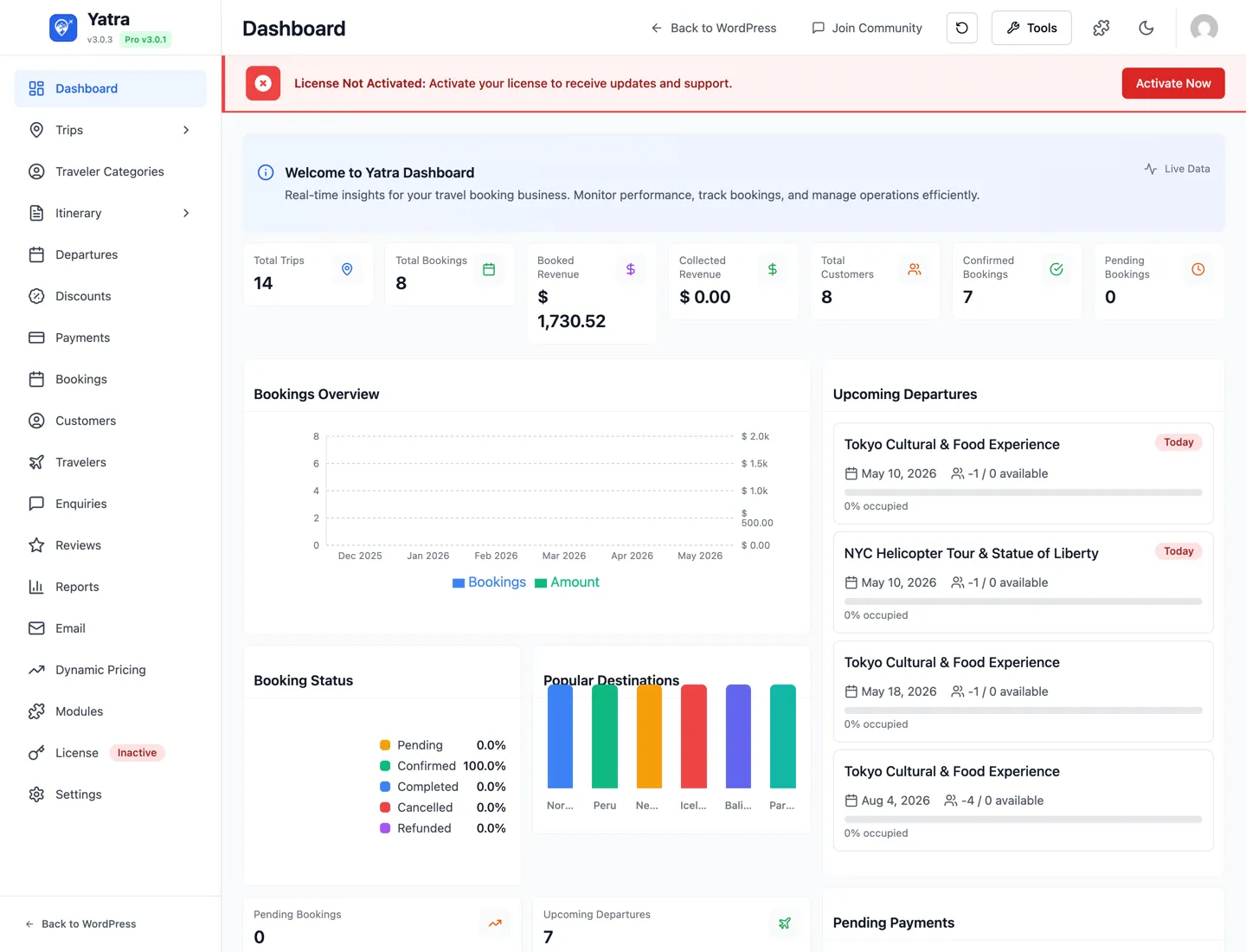
After you install Yatra, open WordPress admin → Yatra. You’ll see a modern app with a sidebar on the left. This page matches those labels to our guides so you never wonder “where do I click?”
Free vs Pro: Some sidebar items only appear when Yatra Pro is installed, the license is active, and the module is turned on under Modules. In the plugin, Pro items often show a small Pro badge—same idea as the gold Pro labels in this documentation.
Left sidebar (top to bottom)
| What you see in Yatra | What it's for | Learn more |
|---|---|---|
| Dashboard | Landing page — quick stats, recent bookings, shortcuts | Quick start |
| Trips → All Trips | The Trips list. Click + Add New Trip to open the create modal | Trips & catalog |
| Trips → Activities | Activity taxonomy (Hiking, Cultural, Wildlife…) used for filtering | Trips & catalog |
| Trips → Destinations | Destinations taxonomy — powers destination archive pages | Trips & catalog |
| Trips → Categories | Top-level trip categories | Trips & catalog |
| Trips → Difficulty Levels | Difficulty taxonomy (Easy / Moderate / Challenging…) | Trips & catalog |
| Trips → Availability | Manual availability dates + recurring rules, per trip | Availability — 3-layer system |
| Trips → Attributes | Custom attributes (Style, Group size…) used as filters | Trips & catalog |
| Trips → Additional Services Pro | Sell add-ons like transfers or insurance | Additional Services module |
| Trips → Trip Consent Pro | Digital waivers and consent forms | Trip Consent module |
| Traveler Categories | Adult / Child / Infant / Senior — pricing tiers | Trips & catalog → Traveler Categories |
| Itinerary → Item Types | Reusable item-type taxonomy (Meal, Activity, Transfer…) | Trips & catalog |
| Itinerary → Items | Reusable itinerary items you can drop into trip days | Trips & catalog |
| Itinerary → Itinerary | The global itinerary library | Trips & catalog |
| Departures | Operator view of every scheduled run | Departures |
| Discounts | Promo codes and group discounts | Bookings & customers → Discounts |
| Payments | Payment ledger, manual payment entry, refund flagging | Payments |
| Bookings | The bookings list and detail page | Bookings & customers |
| Customers | Customer profiles, loyalty tiers, total spend | Bookings & customers → Customers |
| Travelers | Manifest-style roster of every traveler across all bookings | Departures → Travelers roster |
| Enquiries | Pre-sale enquiry inbox with respond modal | Bookings & customers → Enquiries |
| Reviews | Review moderation queue | Bookings & customers → Reviews |
| Reports | Sales / bookings reports | Bookings & customers |
| Delivery settings + transactional templates (+ sequences / logs with Pro) | Email & notifications | |
| Abandoned Recovery Pro | Auto-email cart-abandoners with recovery links | Abandoned Booking Recovery module |
| Dynamic Pricing Pro | Rule engine for season / demand / last-minute pricing | Dynamic Pricing module |
| Modules | Turn Pro features on or off | All modules |
| License | Activate Yatra Pro license | Installation → Step 2 |
| Settings | The 13-tab settings hub | Settings overview |
WordPress may also show Upgrade to Pro under the Yatra menu when you’re on the free plugin—it opens wpyatra.com pricing in a new tab.
What your customers see (front of the site)
Visitors use your theme and Yatra’s templates: trip pages, search, My account, checkout, cart, and shortcodes/blocks. Those are covered in Shortcodes and Blocks & page builders.
Next step
Pick one workflow and follow it end to end:
- Quick start — wizard, first trip, first booking.
- Trips & catalog — build the catalog you’ll sell.
When you’re ready for gateways and templates, use Payments and Email & notifications.