
Dynamic Form Field PRO
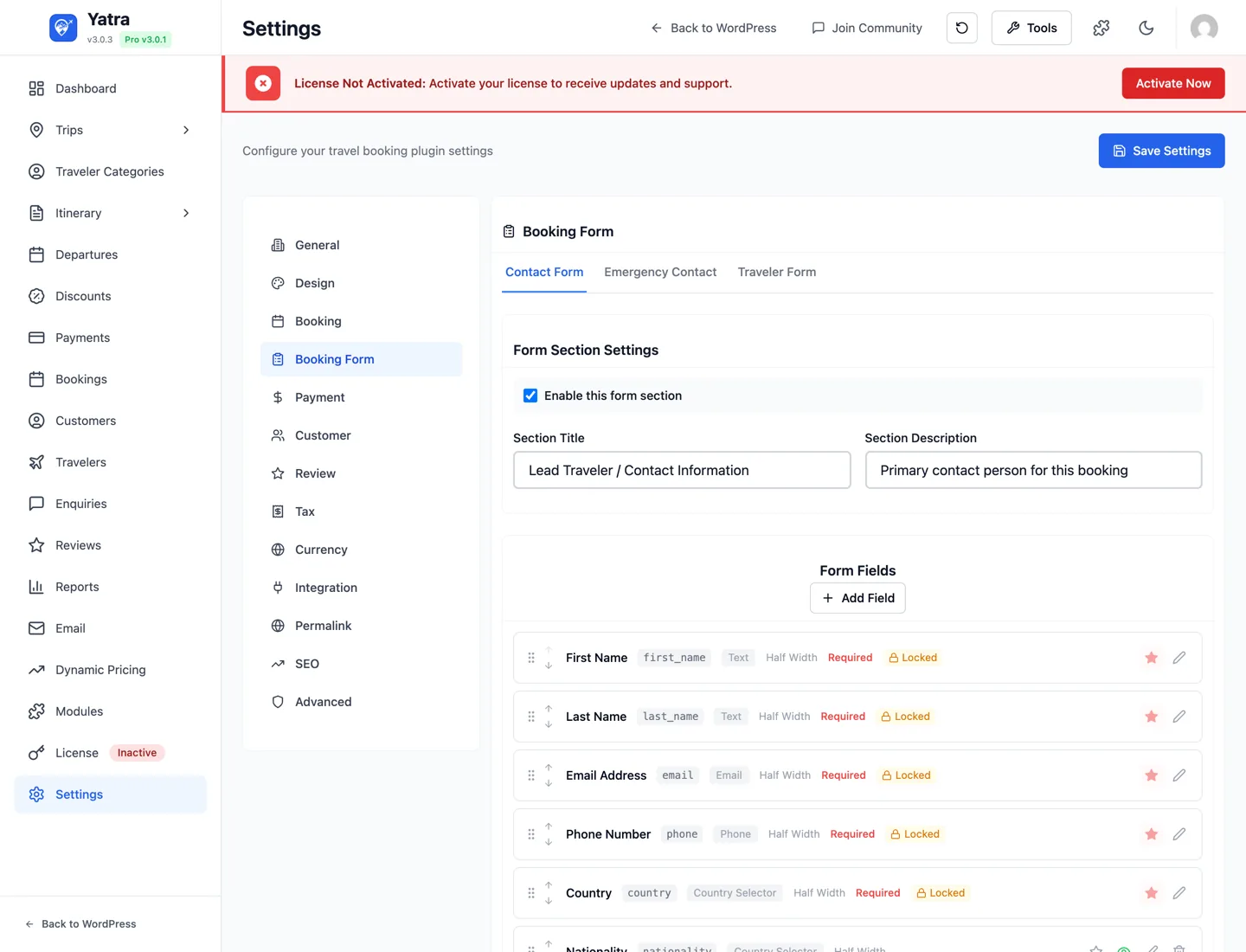
The module unlocks the Booking Form Builder in Yatra → Settings → Booking Form — add, reorder, resize and remove the fields customers fill in at checkout — and lets each form have per-trip versions. A condition says "on these trips, use this version of the form": a food tour can ask Dietary requirements, a trek can ask Fitness level and use a shorter section title, and every other trip keeps the global form.
What you'll need
| Thing | Where to get it |
|---|---|
| Yatra Pro license | Yatra → License |
| Dynamic Form Field module enabled | Yatra → Modules → Dynamic Form Field |
Step 1 — Enable the module
- Open Yatra → Modules.
- Find Dynamic Form Field → toggle on.
- Yatra → Settings → Booking Form becomes editable and each form tab gains a Conditions button.
Step 2 — Build the global form
Open Yatra → Settings → Booking Form. The checkout has three sections, each on its own tab — Contact Form (lead traveller), Emergency Contact, and Traveler Form (repeated once per traveller). Add fields with + Add Field, drag rows to reorder, and click the pencil to edit.
| Field setting | Notes |
|---|---|
| Label / Field ID | Label is what the customer sees; the ID is generated from it and is what the value is stored under. |
| Type | text / email / tel / date / select / country / textarea / number / checkbox / Text Block (display-only). |
| Placeholder | Hint text inside the input. |
| Required | Block submission if empty. |
| Width | full / half / third. |
| Options (select) | Dropdown options as a repeater of { value, label }. |
| Applies to (Traveler tab) | All travelers or Lead traveler only. |
| Show country code (tel) | International flag + dial-code selector on the phone input. |
The lead-traveller first_name, last_name, email, phone and country fields are locked: they can be relabelled but not removed or made optional. Full builder reference: Settings → Booking Form.
This global form is what every trip uses until you add a condition.
Step 3 — Give some trips their own version (Conditions)
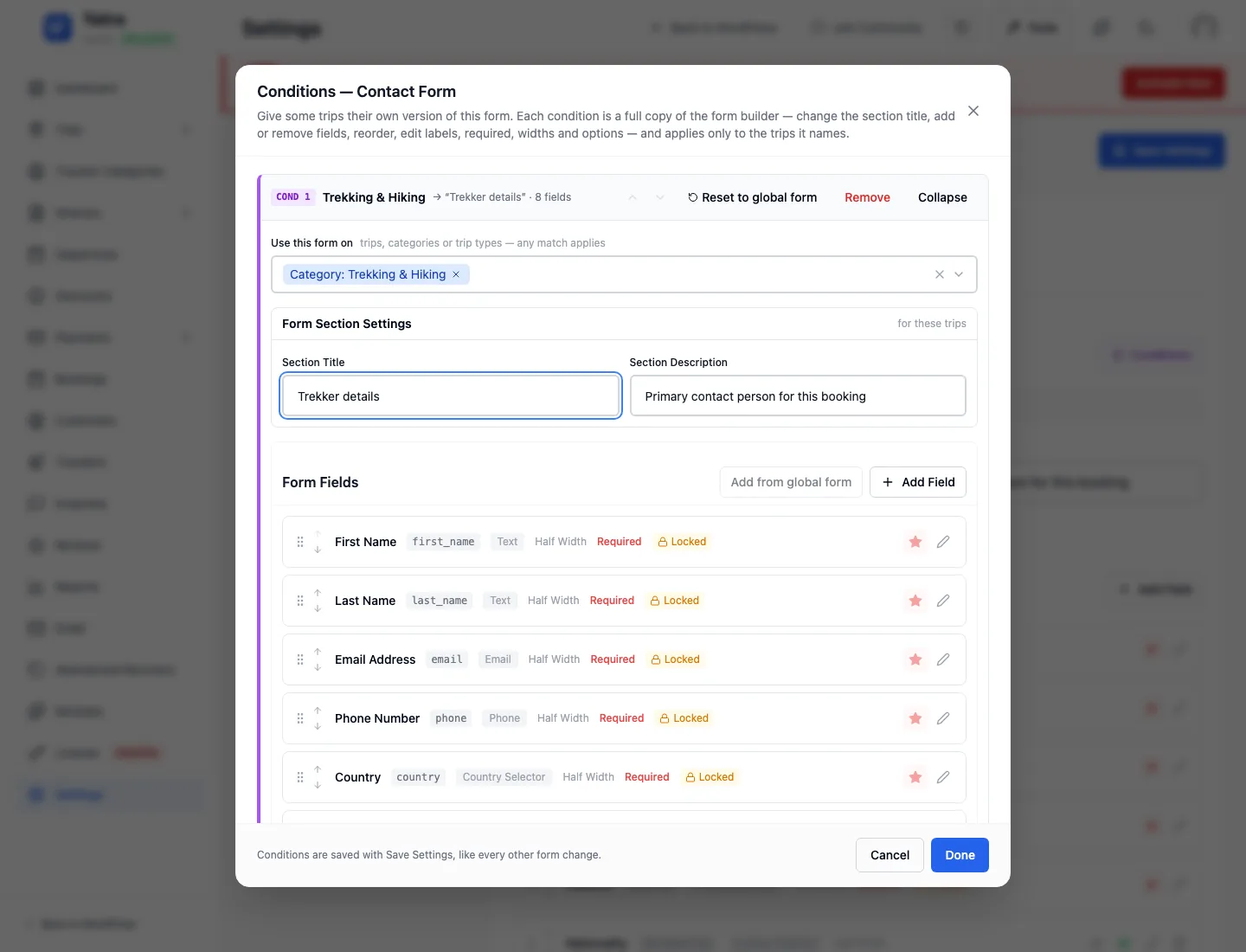
On the tab you want to vary, click Conditions in the Form Section Settings card, then Add condition. The new condition starts as a copy of the global form; change whatever should differ for those trips:
| Part of the condition | What to do |
|---|---|
| Use this form on | Pick the trips it applies to: individual trips, whole categories (sub-categories included) and/or a trip type (single day / multi-day). Any match applies. |
| Form Section Settings | Give this version its own title and description if you like (e.g. Trekker details). |
| Form Fields | Remove fields those trips don't need, reorder, edit any label / placeholder / width / required / options, or + Add Field for a question only these trips ask. Add from global form brings a removed global field back. |
Click Done, then Save Settings on the page — conditions are part of the booking form configuration. The section card now lists the condition (On Trekking & Hiking → "Trekker details" · 5 fields) with an Edit shortcut.
Which version does a trip get?
Conditions are checked top to bottom and the first match wins — reorder them with the ↑ ↓ arrows in the condition header, and put a specific trip above a broad category. A trip that matches no condition uses the global form. Full rules in Settings → Conditions.
A condition is a copy, not a link: editing the global form later does not change it. Use Reset to global form in the condition header to re-copy. On the Contact form the locked lead-traveller fields stay locked inside every condition.
Step 4 — Verify on a test booking
- Open a trip the condition targets in a private browser window → Book Now. The section shows the condition's title and fields.
- Open a trip it does not target → the global form, unchanged.
- Complete a booking on the targeted trip → the answers show on the booking detail under Travelers Information (per-traveller fields) and Customer Information / Emergency Contact, labelled from the version that trip used.
Where the data shows up
| Surface | What you see |
|---|---|
| Booking detail → Travelers Information | Per-traveller field values, labelled from the trip's form version. |
| Booking detail → Customer Information / Emergency Contact | Contact and emergency-contact values. |
| Travelers roster | Who is on the departure; open a traveller's booking for their answers. |
| Emails | Merge tags contact_ or emergency_ followed by the field ID). |
| REST API | Field values are returned in the booking payload. GET /yatra/v1/settings/booking-form?trip_id=N returns the form a trip uses. |
Common patterns
| Trip type | Condition targets | What the version changes |
|---|---|---|
| Food tours | Category: Food & Wine | Adds Dietary requirements (dropdown) to the Traveler form |
| Treks | Category: Trekking | Title Trekker details; adds Fitness level, makes Medical conditions required |
| One special trip | That trip only | Adds a one-off question; put it above the category condition |
| Day tours | Trip type: Single Day Trip | Removes passport / nationality fields for a shorter form |
| Everything else | — | Global form (no condition needed) |
Troubleshooting
No Conditions button — the module isn't on. Toggle Yatra → Modules → Dynamic Form Field.
Done is refused — every condition needs at least one trip, category or trip type in Use this form on.
A trip gets the wrong version — it matches an earlier condition; conditions are checked top to bottom, first match wins. Move the more specific one up.
A global field I changed didn't change on a trip — that trip uses a condition, which is a copy. Edit the field inside the condition, or Reset to global form and redo the differences.
Field appears at checkout but not on the booking detail — the field was added after this booking was made. Existing bookings only carry fields that existed at booking time.
A locked field can't be removed inside a condition — by design. First name, last name, email, phone and country are required on every booking.
Useful links
- Settings → Booking Form — full builder reference and the condition rules.
- Bookings → Travelers Information — where per-traveller answers show up.
- Email merge tags —
+. - Hooks & filters —
yatra_booking_form_config,yatra_save_booking_form_config.
Where to read more
- All modules — module catalog.